


Most analytics products can tell you that somebody viewed a page. A website operator needs to know much more.
Was the request made by a person, a search engine, an AI crawler, or a scanner? Which images and scripts consumed the bandwidth? Which page requested a missing file? Is another domain using your images? Which visitors received errors? Should a suspicious source be monitored, rate-limited, or blocked?
Kooboo can answer these questions because analytics is not an external script added after the website is built. It is part of the platform that serves the page, executes the application, delivers the resources, and handles every request.
Kooboo does not only measure the website. It connects measurement to operation and protection.
For many websites, the cookie banner can disappear
Website owners do not add cookie banners because visitors enjoy clicking them. In many cases, the banner exists primarily because the site installed Google Analytics or another browser-based analytics product that uses optional cookies, browser identifiers, or third-party data processing.
Kooboo changes that decision. Detailed first-party analytics is already provided by the platform that serves the website. A site can remove the third-party analytics script while continuing to measure visitors, pages, countries, browsers, devices, network conditions, bots, resources, bandwidth, and errors.
If analytics was the only non-essential technology that required consent, removing that tracker may also remove the need for the cookie banner. For many ordinary Kooboo websites, the result can be:
No Google Analytics. No analytics cookie. No analytics-driven cookie banner.
This is not hiding the banner or weakening consent. It is removing the unnecessary technology that made the banner necessary.
The commercial effect can be substantial. A consent popup interrupts the visitor's first experience, covers content, adds a decision before the visitor understands the offer, and can cause abandonment—especially on mobile. If a banner costs a site around one conversion in ten, removing the reason for that banner can recover that opportunity directly.
The exact improvement will vary by audience, design, jurisdiction, and existing consent experience, so Kooboo should not promise a universal 10% uplift. But conversion recovery is an important reason to measure the before-and-after result rather than treating the cookie banner as harmless.
The fastest and highest-converting cookie banner is the one the website genuinely no longer needs.
Open the menu. The analytics is already there.
There is no analytics package to install, no tracking snippet to paste into every page, and no separate reporting account to configure.
Open your website in Kooboo and select Operations → Traffic Analytics. Detailed first-party traffic information is directly available, including:
- Page views and daily unique visitors
- Human and machine traffic rates
- Error count and error rate
- Countries and regional traffic
- Top pages, images, referrers, browsers, and devices
- Bot names and good, bad, or unknown classification
- Viewport width, pixel density, and color preference
- Effective connection type
- Round-trip time, or RTT
- Reported downlink speed
- Response status, size, and server execution time
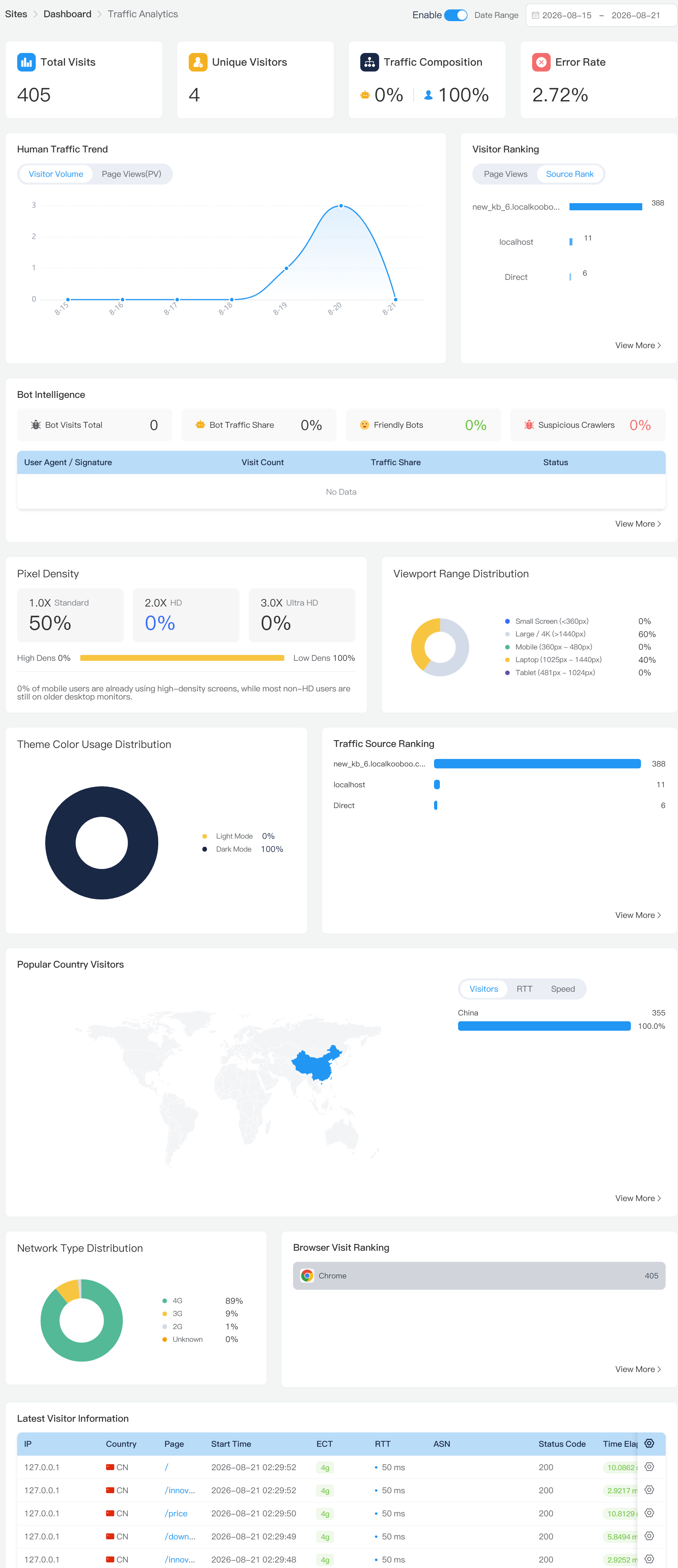
The results become available as requests are processed. Kooboo does not need to export the website's activity to an external analytics network and wait for that service to send a report back.
One runtime sees the complete request
Browser analytics sees what its JavaScript is allowed to observe after a page begins loading. Kooboo sees the request from the system responsible for handling it.
That includes far more than HTML page views:
- Pages and public APIs
- Images, stylesheets, JavaScript, fonts, and downloads
- Successful, failed, missing, limited, and protected requests
- Human visits, known bots, crawlers, and suspicious automation
- Response size, status code, and server execution timing
A browser script does not need to tell Kooboo that Kooboo just served a file. This server-side position gives the operator a more complete operational picture, including activity that a conventional page-view dashboard commonly ignores.
Separate real visitors from automated traffic
A traffic spike is not automatically an audience increase. It may come from a search crawler, an uptime monitor, an AI bot, a scraper, a vulnerability scanner, or unwanted automation.
Kooboo reports human-versus-machine traffic and provides bot intelligence rather than silently mixing every request into one visitor number. You can examine which bots are active, how many requests they make, which resources they consume, and whether the current classification considers them good, bad, or unknown.
This makes traffic data more useful:
- Understand whether growth came from people or machines.
- Measure the pages and bandwidth consumed by crawlers.
- Identify repeated requests for suspicious or nonexistent paths.
- Distinguish useful search indexing from unwanted automation.
- Turn an observed IP address or User-Agent pattern into a protection rule.
Bot detection is an intelligence signal, not an infallible identity system. Unknown automation should be investigated rather than automatically treated as malicious.
Error monitoring belongs beside traffic analytics
A page-view total cannot tell you whether the page, API, or server-side script actually worked.
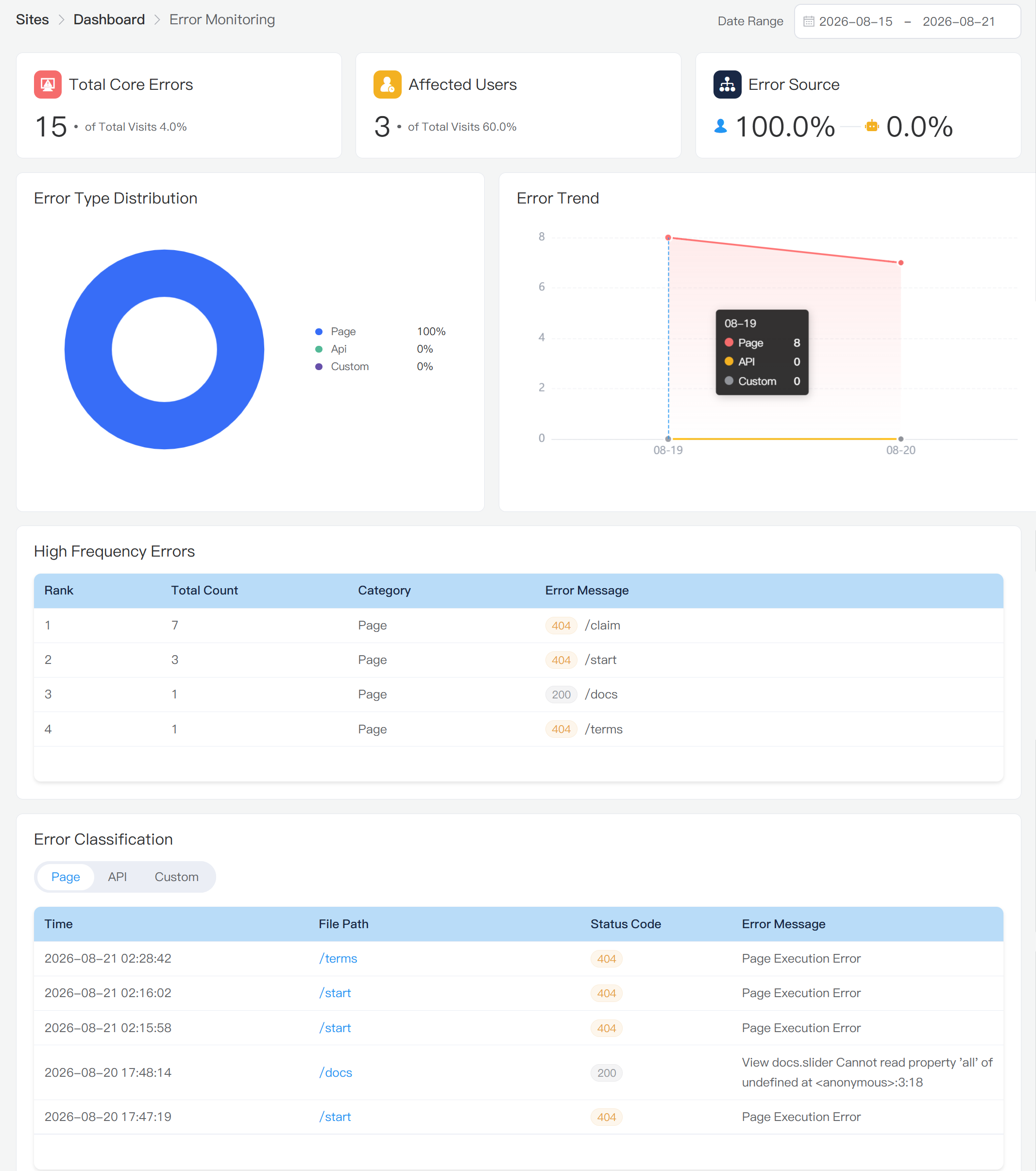
Kooboo Error Monitoring brings operational failures into the same website environment. It summarizes recorded page, API, KScript, and custom errors and shows:
- Total errors and error rate
- Affected visitor identifiers
- Human-versus-bot error sources
- Error trends and type distribution
- High-frequency failing URLs
- Individual error time, URL, status, and message details
This connects reliability to real traffic. A high-frequency failure can be investigated as a page, API, script, or custom application problem instead of appearing only as a mysterious drop in conversion.
Measure the resources that make the website work
A modern website is not only a collection of pages. Images, CSS, JavaScript, fonts, files, and downloads determine speed, bandwidth, availability, and cost.
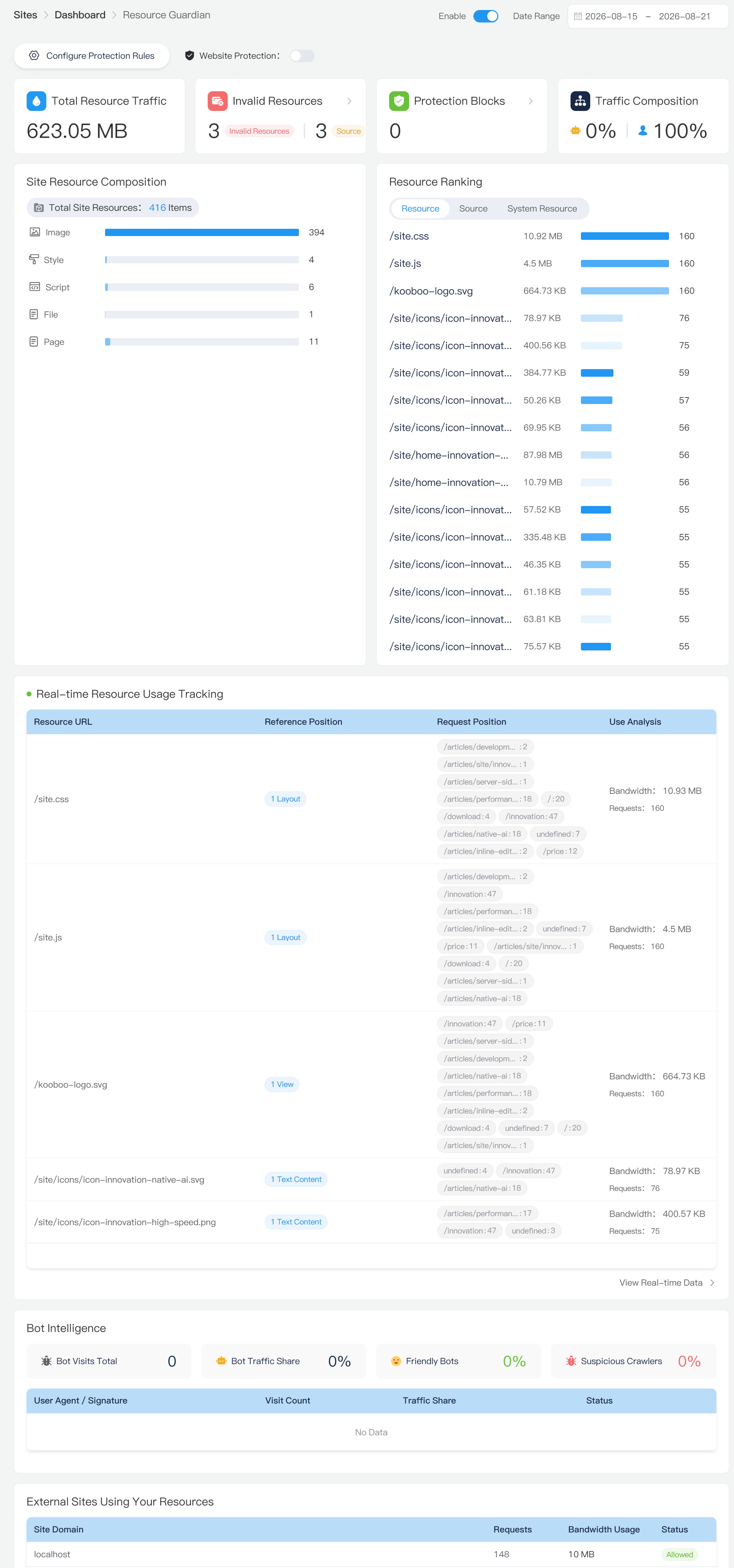
Resource Guardian observes this layer. It can show:
- Human and bot resource requests
- Human, bot, and total bandwidth consumption
- Bandwidth distribution by resource type
- Most-requested and highest-bandwidth resources
- Pages that generated resource requests
- Missing images, styles, scripts, and files
- Known pages that referred to missing resources
- Protected requests and protection results
This is particularly useful after a redesign, migration, or content update. Instead of waiting for a visitor to report a broken image, Kooboo can show which missing resource was requested and, when the source is known, which page referred to it.
See external domains consuming your images and files
When another website embeds an image directly from your domain, your server delivers the file and pays the bandwidth cost. Ordinary page analytics rarely makes this visible.
Resource Guardian groups external referrer domains and reports their request counts and transferred bytes. This gives the operator a practical view of domains that appear to be using or hotlinking site resources.
You can move from observation to action:
- Identify an external domain requesting your resources.
- See how many requests and how much bandwidth it generated.
- Create a resource-protection rule for selected paths or file extensions.
- Return 403 Forbidden or redirect matching later requests.
- Review protected-request statistics to see the effect.
External-domain detection uses the HTTP referrer. Referrers can be absent or forged, so the result is strong operational evidence, not proof of domain ownership or copyright infringement. For hotlink protection, however, it is a valuable capability that conventional traffic dashboards generally do not provide.
Turn analytics into protection
Visibility matters most when the operator can act on it. Kooboo includes several protection layers inside the same platform.
Block specific IP addresses or User-Agent patterns
From visitor information, an operator can add an IP address or User-Agent keyword to the site's request-access rules. Matching later requests are rejected before the page is rendered.
Rate-limit abusive or expensive traffic
Kooboo can apply fixed-window request limits to all page traffic or to selected IP addresses and User-Agent patterns. The operator chooses how many requests are permitted within a defined number of seconds; requests beyond the limit receive a rate-limit response.
Protect resources by path, extension, and source domain
Resource-protection rules can target a path prefix, one or more file extensions, and listed external referrer domains. Rules run in priority order and can forbid or redirect matching requests.
Automatically restrict obvious path scanners
Kooboo recognizes requests for selected high-risk probe paths, including common attempts to retrieve environment files, repository metadata, credentials, configuration files, and known administration or shell endpoints. Some paths trigger immediate temporary IP restriction; repeated lower-confidence probes cross a threshold before restriction.
Automatic restrictions are enforced early in request processing and return a 403 response to the temporarily restricted IP. This helps reduce repeated scanner traffic without requiring an operator to manually copy every attacking address from a log.
Observe the request, understand its cost and intent, then apply the appropriate rule—all within Kooboo.
Understand the visitor's real environment
Where the browser supplies the relevant client hints, Kooboo can organize information such as RTT, downlink, effective connection type, viewport width, pixel density, color preference, country, browser, and device category.
This turns analytics into an engineering tool:
- Prioritize layouts for the viewport sizes visitors actually use.
- Choose image sizes appropriate for real pixel densities.
- Investigate regions with slower reported network conditions.
- Compare response size and server timing across request groups.
- Find browsers or devices associated with unusual error patterns.
Not every browser supplies every signal. Kooboo reports available request information rather than inventing missing values.
GDPR-friendly by design
Kooboo's privacy advantage is larger than a cookie banner.
Traffic, resource, bot, and error analytics are built into the platform that operates the website. A site can gain substantial first-party operational insight without automatically adding a third-party analytics script, third-party analytics cookie, or external visitor-data pipeline.
For many ordinary deployments, removing unnecessary third-party tracking can also remove the main technical reason for an analytics cookie banner. The visitor receives the website instead of first receiving a popup created to manage an avoidable tracker.
This supports a GDPR-oriented approach:
- Collect data for a defined operational purpose.
- Keep measurement first-party where practical.
- Avoid optional browser identifiers and third-party transfers when they are not needed.
- Minimize the data and retention required for the purpose.
- Use access controls and protection rules around the website.
- Explain the processing clearly in the privacy notice.
No software product can declare every website legally compliant. IP addresses, referrers, request headers, pseudonymous identifiers, customer records, and interaction data may still be personal data. The operator must choose an appropriate lawful basis, retention policy, privacy notice, security controls, and rights-handling process for the deployment and jurisdiction.
Kooboo's architectural advantage is a cleaner starting point: useful website intelligence with fewer unnecessary external trackers and fewer browser-side dependencies.
When consent is required, block before delivery
Some websites genuinely require optional advertising, embedded media, maps, chat, marketing, or third-party analytics. Kooboo Cookie Management handles this case with configurable categories, regions, resources, descriptions, and visitor choices.
For configured script, image, iframe, and stylesheet URLs, enforcement begins during server rendering. Until the applicable category is allowed, Kooboo replaces active loading attributes such as src and href with inactive kc-src and kc-href attributes.
<script
  kc-src="https://tracker.example/analytics.js"
  kc-category="analytics">
</script>
The browser does not treat kc-src as a download instruction. The configured blocked file is therefore not requested, downloaded, parsed, compiled, or executed before permission.
This is both a privacy and a performance benefit. Kooboo does not send the blocked JavaScript file to the browser and then ask a client-side manager to suppress it. The active URL is absent from the delivered HTML until the visitor's choice permits it.
No permission → no active URL → no request.
This control applies to resources configured through Kooboo Cookie Management. Dynamically created requests, inline code, browser storage, server-set cookies, CSS URLs, and other application behavior must also be reviewed as part of the site's complete consent implementation.
From observation to interaction and outcomes
Server traffic explains what the server handled. Selected first-party page-interaction events add another level: what a visitor did after the page arrived.
Kooboo's direction connects four layers of website intelligence:
- Traffic: who or what requested the website?
- Operation: what resources, bandwidth, errors, and protection events were involved?
- Journey: which path and interactions led through the website?
- Outcome: did the application produce a meaningful result?
Traffic Analytics, Resource Guardian, Error Monitoring, bot intelligence, request protection, and selected Page Interaction capabilities are available now. User Journey and the complete goal-attribution workflow remain under development.
Server-side A/B testing without page flicker
Kooboo's A/B Testing architecture selects a variation while the website is rendering. This avoids the familiar client-side sequence in which the original page appears, an experiment library downloads, and visible content changes after the visitor can already see it.
Rendering the selected experience on the server can eliminate experiment flicker and keep variation delivery inside the same first-party platform as measurement and goal processing.
One platform instead of a stack of disconnected tools
A conventional website may use one product for traffic analytics, another for bots, another for errors, another for bandwidth, another for consent, another for rate limiting, and another for experiments. Each tool sees only part of the website, adds integration work, and may introduce another external dependency.
Kooboo brings the essential layers together:
- Measure: visitors, pages, countries, devices, networks, bots, resources, bandwidth, and errors.
- Understand: distinguish people from machines, connect failures to requests, find broken resources, and identify external domains consuming files.
- Protect: block IPs and User-Agent patterns, set request rates, protect selected resources, and automatically restrict recognized scanners.
- Respect privacy: use first-party server intelligence, minimize unnecessary tracking, and enforce configured consent before optional resources reach the browser.
- Improve: add page interaction, journeys, meaningful goals, and server-rendered experiments.
Analytics should not end with a chart. It should help you operate a faster, safer, more private, and more effective website.