


Many website platforms have added an AI text box. It can write a headline, generate a section, suggest some code, or produce a page that looks convincing in a preview.
Then the difficult work begins.
The generated page must become a real website. It needs structured content, routes, responsive behavior, server logic, APIs, forms, data, commerce, multilingual content, performance, testing, deployment, monitoring, and a safe way to change it after launch. When something fails, someone still has to find the real source, understand the runtime, reproduce the problem, repair the code, test the result, and publish it.
Kooboo was built around a larger idea:
AI shouldn't stop at building a page; it must operate the website.
Kooboo gives AI direct, structured access to the website platform: its Pages, Layouts, Views, content, data, routes, styles, scripts, APIs, commerce, analytics, browser preview, sandbox, history, automation, and deployment-related workflows. AI can work on the same real website objects that developers and editors use.
That is what we mean by native AI. AI is not an isolated feature beside the product. It is connected to the complete website lifecycle.
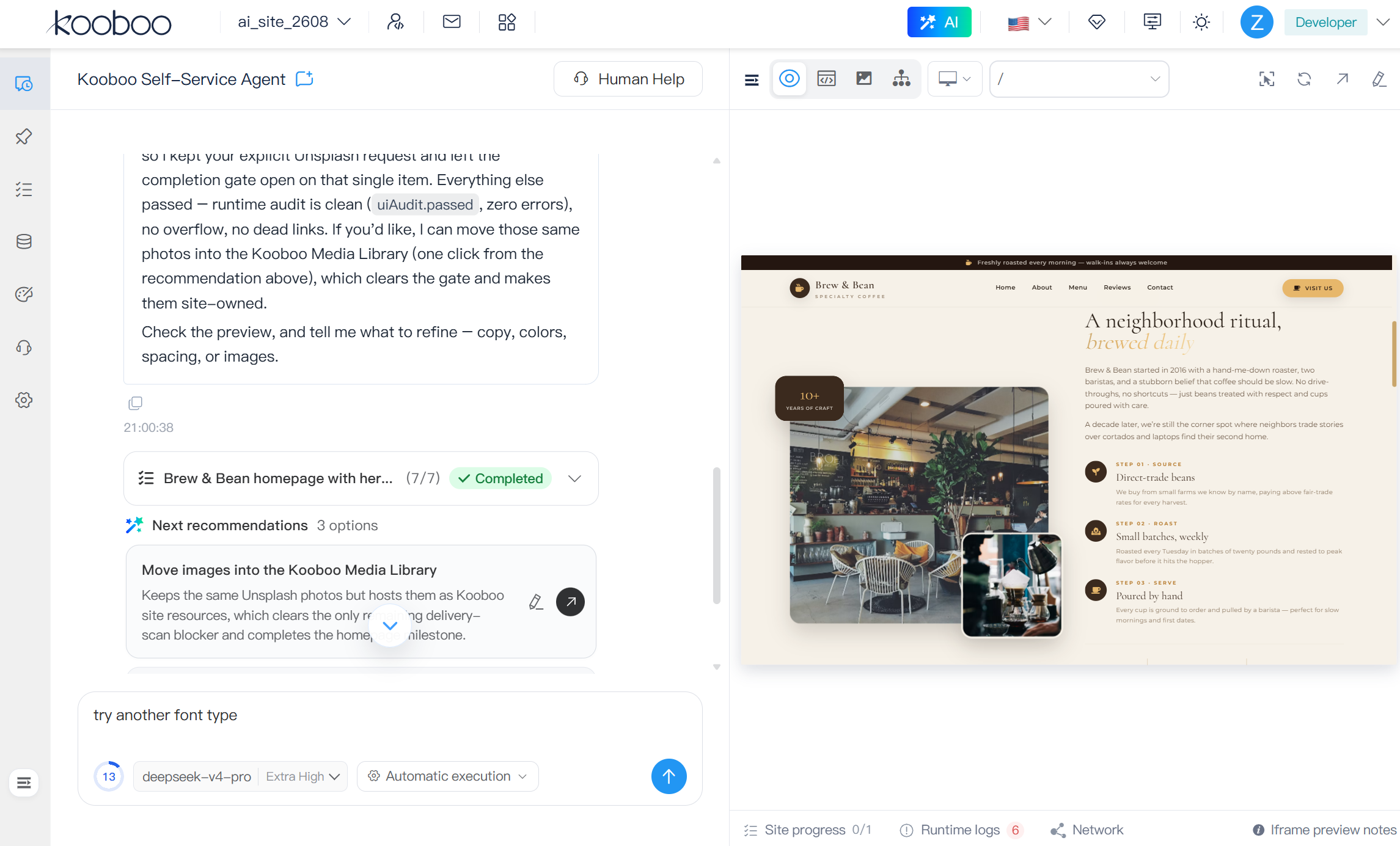
Do not ask AI for code. Give it a real job.
Imagine asking:
Build a responsive ecommerce website for a coffee brand. Add ten products, product categories, a shopping cart, multilingual labels, SEO metadata, and a contact form. Test the mobile layout, find broken requests, and fix anything that prevents checkout.
On a conventional AI website generator, this request usually ends with generated frontend code. The result may look complete, but the data, backend, operational tools, and production workflow remain separate problems.
In Kooboo, AI can work through the real platform:
- Understand the goal and prepare an application blueprint and implementation plan.
- Create the required Pages, Layouts, Views, Styles, Scripts, content models, records, routes, APIs, and server-side logic.
- Use Kooboo's content and commerce capabilities instead of inventing temporary mock data.
- Open the running website in the integrated browser workspace.
- Navigate the site, inspect rendered elements, and test it at desktop, tablet, and mobile sizes.
- Read runtime logs and abnormal network requests when the result does not behave correctly.
- Resolve a selected visual element back to its Page, View, or Layout source.
- Update the real source or data, render again, and inspect the result.
- Use history to review, compare, undo, restore, or check out supported changes when necessary.
- Continue operating the site through analytics, scheduled AI routines, maintenance, and future improvements.
This is not one enormous prompt followed by a blind code dump. It is an operating loop:
Understand → Build → Run → Inspect → Diagnose → Repair → Verify → Publish → Observe → Improve
Every stage takes place around the same Kooboo website.
AI works with the real architecture of the website
AI becomes much more useful when the platform can explain itself in structured operations.
The current Kooboo source contains more than 100 built-in AI functions. These are not generic instructions such as “please edit the website.” They are explicit capabilities with names, descriptions, input schemas, result schemas, tags, and approval metadata.
They cover work such as:
- Website structure: create and manage Pages, Layouts, Views, routes, HTML blocks, Styles, Scripts, CodeBlocks, and APIs
- Content: create content types and folders, inspect schemas, query records, create content, update content, and manage Labels
- Development: search source, read real website objects, update text objects, inspect preview-element context, and run KScript
- Commerce: work with products, categories, discounts, customers, carts, orders, and sales statistics
- Operations: inspect visitor traffic, resource usage, errors, external URLs, cookie configuration, site users, roles, and automations
- Media: resize images, change formats, and add watermarks
- Safety and recovery: create a Sandbox, render and request pages inside it, inspect history, compare versions, undo changes, restore a site, or check out a historical state as another website
- Long-running work: create AI task jobs, inspect their progress, continue a task, and report completion
Because Kooboo understands these operations natively, AI does not need to guess where a page lives, invent an unsupported database method, or treat the website as one undifferentiated text file. It can discover the available function, load its authoritative schema, and call it with structured arguments.
The platform does not merely give AI more context. It gives AI real capabilities.
Select what you mean on the real website
One of the most frustrating parts of working with AI is explaining which part of the result needs to change.
“Make the card smaller” is ambiguous. Which card? On which page? Is it generated by the Page, a reusable View, or a Layout? Is the visible text stored in the HTML, a Label, or a content record?
Kooboo's browser workspace lets the user select an element on the rendered website and send that selection to AI. The context can include the element's selector, tag, text, rendered HTML, current URL, and its known source owner.
Kooboo then provides a source-aware function that resolves the rendered selection back to the current Page, View, or Layout HTML. It parses the real source with Kooboo's DOM engine, finds the matching element, identifies its source line, returns its parent context, and includes a body hash so the AI can work against the version it actually inspected.
This creates a direct connection:
What the user points at → what the browser rendered → which source object produced it → what AI should update
The same principle works from the code side. A developer can select source in Kooboo's editor, or add a code resource as conversation context, and ask AI to explain, repair, or extend that exact code.
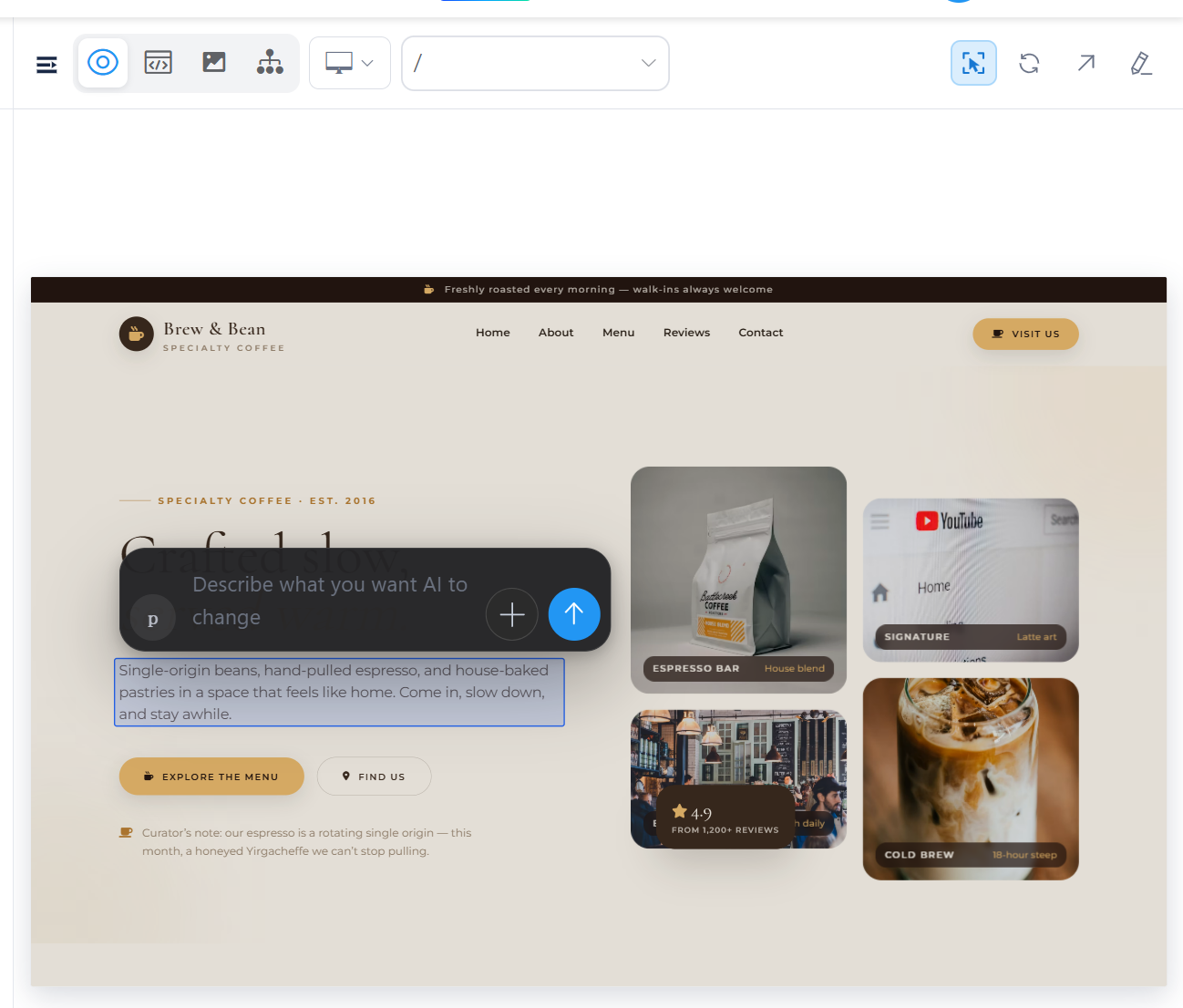
The browser is part of the AI system
Generated code is not proof that a website works. The rendered website is the proof.
Kooboo's AI browser workspace is designed for observation and interaction with the running site. AI can use it to:
- Open and navigate the website
- Inspect the current page and visible elements
- Click, type, select, scroll, and interact with supported controls
- Wait for navigation, text, elements, readiness, or URL changes
- Switch between desktop, tablet, and mobile previews
- Observe changes after an action
- Capture runtime logs, warnings, and errors from the preview
- Inspect failed, timed-out, or abnormal network requests
- Run interface and diagnostic checks against the rendered result
This changes the quality of AI development. Instead of saying, “I created the form,” AI can open the page, fill in the form, submit it, observe the response, inspect the network request, read a runtime error, update the responsible source, and test again.
Some flows still need normal real-browser verification. Authentication boundaries, payment redirects, device capabilities, third-party restrictions, and behavior blocked by an embedded preview should be tested in a full browser tab. Kooboo makes that boundary visible instead of pretending that an iframe can prove every external interaction.
AI should not declare success because the source looks plausible. It should inspect what the visitor will actually use.
AI can build a dynamic website, not only a static frontend
A real website is more than HTML and CSS. It contains data, business rules, identity, content management, APIs, forms, scheduled work, and operational state.
Because these capabilities are already part of Kooboo, AI can build with them directly. It can create a content model and records, query them with <k-data>, generate server-rendered pages, add server-side JavaScript, expose an API, manage a product catalog, or connect the result to Kooboo's built-in application services.
The result remains understandable to people:
- Someone who knows HTML can inspect and edit the templates.
- Someone who knows JavaScript can extend the client and server behavior.
- An editor can update content without editing code.
- A developer can debug the same application in Kooboo's online IDE or through the Kooboo CLI workflow.
- AI can continue working with the same native website objects after the first generation.
AI does not leave behind a proprietary picture of a page. It leaves behind a real Kooboo website that people can inspect, edit, export, host, and continue developing.
KScript gives AI the reach of the platform
A fixed collection of AI tools is useful, but it can never describe every future operation.
Kooboo therefore connects AI to KScript, the JavaScript API surface used by Kooboo applications. After loading the relevant reference, AI can execute JavaScript against supported Kooboo services for content, databases, files, commerce, networking, media, email, pages, site objects, and utilities.
This has two important consequences.
First, Kooboo does not need to wait for a new hardcoded AI function before AI can use every appropriate platform capability. The native function layer handles common operations with strict schemas; KScript provides a broader programmable path for advanced work.
Second, a Kooboo developer can create a site-specific AI function in JavaScript. The function can define its own name, description, parameters, tags, approval requirement, and implementation. AI can discover and use that capability as part of the site.
If your application can express an operation through Kooboo, you can make that operation available to AI.
AI learns capabilities when it needs them
Giving an AI model every API description, coding rule, commerce contract, browser command, and operational warning in every conversation would consume context and reduce precision.
Kooboo uses progressive discovery instead.
AI can discover functions by capability, load the exact input and return schemas before calling them, load a specialized skill, read only the required reference, and run a skill's prepared scripts. Current skill packages cover areas such as Kooboo development, CMS operations, browser control, debugging, sandbox use, history, AI task automation, and interface design.
This architecture is important for long-term growth. New native functions, KScript APIs, workflows, and domain-specific skills can be added without turning every AI request into one enormous system prompt.
A Sandbox that is a real Kooboo website
AI becomes far more useful when it can experiment without immediately changing the production site.
Kooboo can create a hidden, unpublished Sandbox website with its own WebSite and SiteDb. Selected website objects can be copied into that isolated site, where AI can work with a real Kooboo runtime instead of a simplified mock environment.
Inside the Sandbox, Kooboo can:
- Evaluate
<k-data>queries - Execute KScript
- Render template HTML
- Request a relative page URL
- Return the rendered body, status code, execution time, and supported response information
- Use Sandbox-aware website functions against the isolated site
The important point is environmental fidelity. The Sandbox uses Kooboo's real database, template engine, scripting runtime, and website objects. Test and production use the same platform architecture.
The current Sandbox is deliberately explicit. It does not silently merge changes into production, and it does not make external side effects harmless. Email, payment, network, and third-party operations still require care. After the user accepts the result, production changes remain a separate, reviewable action.
That is a safer foundation than asking AI to experiment directly on the live website.
History turns AI changes into something you can inspect and reverse
AI speed is valuable only when the owner remains in control.
Kooboo's history capabilities let AI and users inspect recent changes, filter the history, open a specific record, list versions of an object, and compare two revisions. When approved, Kooboo can undo one change, undo a selected group, restore the site to a log entry or time, or check out a historical state as another website.
This supports several practical workflows:
- Show exactly what changed in a Page or View.
- Compare an older version with the latest version.
- Undo a narrow change instead of restoring the entire site.
- Review a historical website as a separate checkout before deciding to restore anything.
- Recover after an AI change, developer mistake, or unwanted content update.
Sandbox reduces the chance of a harmful change reaching production. History helps recover when a supported production change still needs to be reversed. Together, they make AI operation more accountable.
AI can move quickly. The website owner should still be able to see where it went and bring it back.
Choose how independently AI may work
Different environments need different levels of control. A personal prototype, an agency staging site, and a production ecommerce system should not all use the same execution policy.
Kooboo provides three site-level modes:
- Always ask: functions marked as approval-required wait for confirmation.
- Automatically run allowed operations: the site maintains an allow-list of approved functions.
- Automatic execution: eligible functions can run without individual confirmation.
Function availability is also controlled through the site's AI Service configuration. Kooboo distinguishes read operations from many write, delete, execution, and recovery operations through function metadata, while site permissions control who may change the shared policy.
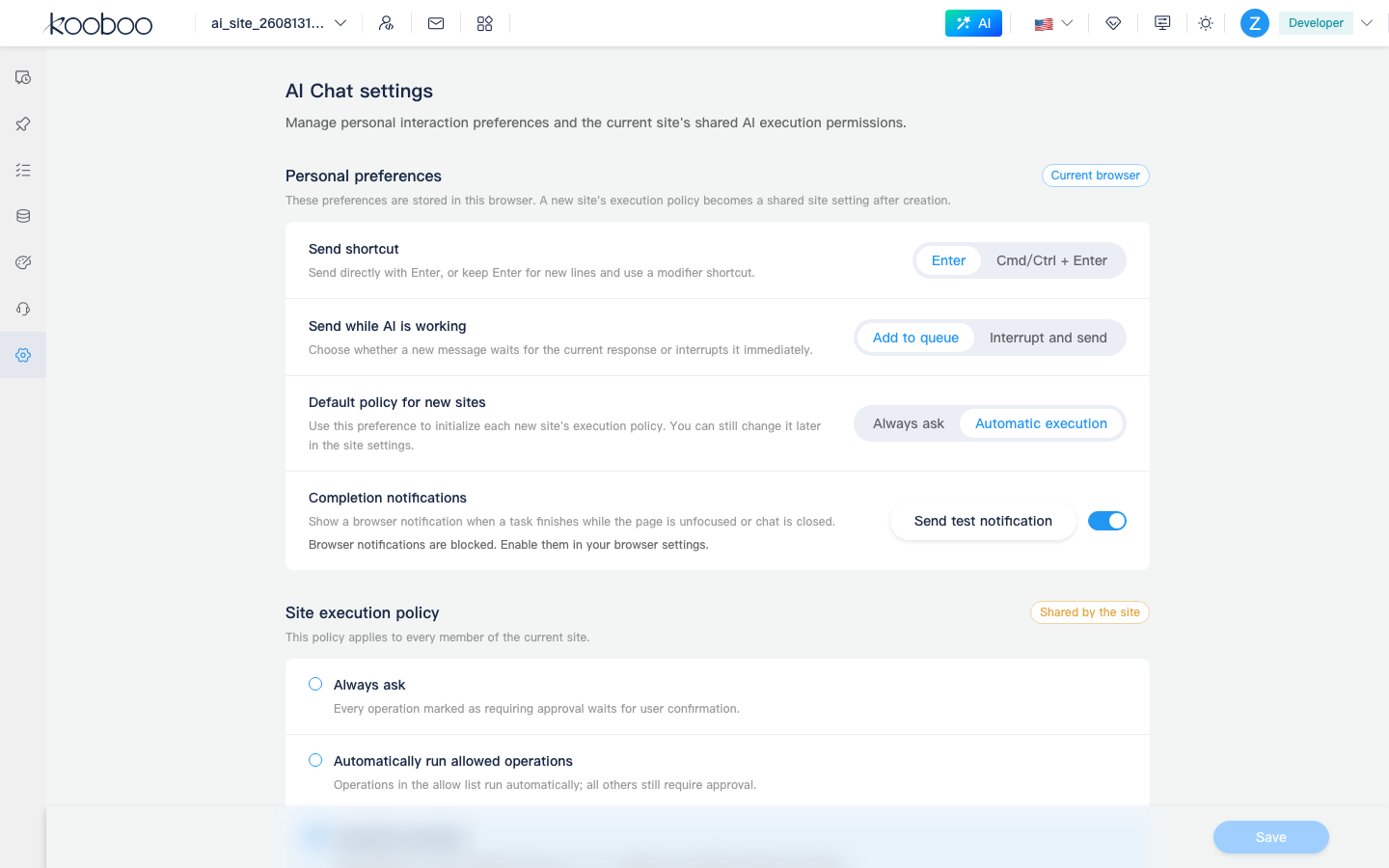
The objective is not to force every user into maximum automation. It is to let the owner choose the appropriate balance between speed and supervision.
AI can keep working after the conversation ends
A website needs continuous attention. Products become incomplete, SEO metadata goes missing, resources fail, labels become inconsistent, traffic changes, and configuration gradually drifts.
Kooboo can turn an AI instruction into a task that runs once or follows a schedule. The current source includes task templates for:
- SEO metadata audits
- Content health checks
- Error and resource health checks
- Label consistency checks
- Product quality audits
- Order summaries
- Visitor traffic reports
- Site preflight scans
- Daily site operations checks
- Weekly configuration reviews
Each execution has a status and a complete task record. A user can inspect waiting, running, completed, or failed jobs and continue a new conversation from the task context when follow-up work is required.
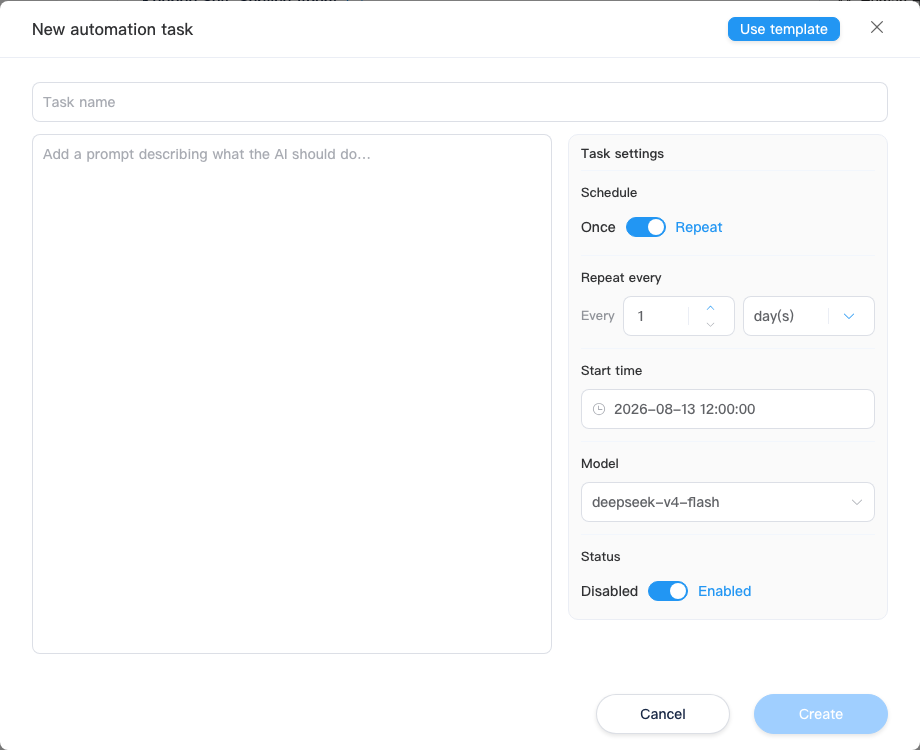
This moves AI beyond one-time generation. The same system that helps build the website can continue checking and operating it.
One AI conversation, multiple working surfaces
Kooboo provides a dedicated AI workspace for larger jobs and a floating assistant for contextual help inside the administration interface. Both use the same underlying conversation and tool capabilities.
The dedicated workspace can place several kinds of evidence beside the conversation:
- A live Browser preview
- The site's source tree and code
- The Media Library
- Content and commerce data
- Design variables
- An application blueprint
- Todos, milestones, and recommended next actions
- Scheduled routines and their execution history
The floating assistant keeps the current Kooboo administration page visible, making it useful for questions and actions that depend on the page the user is already viewing.
AI does not have to live in a separate website generator that loses context when the generation ends. It remains available where the website is edited, developed, tested, and operated.
Use the model you choose
Kooboo separates the website platform from the AI model. An organization can configure supported providers, endpoints, models, and credentials, then choose an available model for a conversation or scheduled task.
The current source contains provider integrations for OpenAI-compatible services as well as dedicated support for providers including Anthropic, Google, and DeepSeek, with additional provider configurations present in the platform.
This matters because models will continue to change. The enduring value should remain in the website, the native capabilities, the operational history, the testing workflow, and the owner's data—not in dependence on one temporary model.
Why Kooboo is unusually ready for AI
AI works best when the system around it has a clear model of reality.
Kooboo already knows what a Page is. It knows how a Layout and View contribute to the rendered HTML. It knows where content and Labels live. It owns the DOM engine, template engine, database engine, server-side JavaScript runtime, routing, rendering, analytics, history, packaging, and browser workspace.
That integration removes many of the boundaries that normally stop AI:
- The page generator is not separated from the CMS.
- The CMS is not separated from the application runtime.
- The runtime is not separated from the data model.
- The source editor is not separated from the live preview.
- The preview is not separated from diagnostics.
- The AI assistant is not separated from native website operations.
- The finished site is not trapped inside the AI service.
This is why Kooboo's AI story is larger than content generation. The platform gives AI a coherent environment in which it can understand, build, execute, inspect, repair, and continue operating a website.
The result belongs to you
AI website creation often comes with a hidden trade: the generated result works only inside the vendor's hosted service. The customer can use the site but cannot truly possess the complete application.
A Kooboo website remains a real, editable, portable website. You can inspect its Pages, Views, Layouts, data, scripts, styles, APIs, and settings. You can change it by hand. You can continue with AI. You can export it as a Kooboo package, move it to another Kooboo instance, host it under your own domain, and keep developing it.
AI may build the website. Kooboo makes sure the finished website remains yours.
Native AI is a complete product loop
The long-term advantage is not one model, one prompt, or one generated landing page. It is the complete owner-controlled loop:
Build → Run → Observe → Diagnose → Modify → Validate → Publish → Measure → Improve
Kooboo is connecting AI to every stage of that loop.
It can create the real website. It can work with dynamic content and application logic. It can inspect the rendered result through a browser. It can connect a selected element to its source. It can read diagnostics. It can work in a real isolated Kooboo site. It can inspect and reverse supported changes through history. It can run scheduled operational tasks. And it can leave the owner with a portable website that remains open to both human and AI development.