


Turning an existing website into a multilingual website is usually treated as a new development project.
Teams duplicate pages, install translation plugins, redesign routes, rebuild navigation, create language-specific APIs, repair links that lose the selected language, and manually maintain SEO metadata for every translated URL.
Kooboo makes multilingual support part of the website itself.
Enable the languages, scan the existing site for translatable text, add the language switcher, and choose how language should appear in the URL. Kooboo then carries the active culture through rendering, content queries, links, routes, redirects, and search-engine metadata.
You do not rebuild the website for every language. You teach one website how to speak them all.
The complete workflow takes four steps
- Enable multilingual support and choose the languages.
- Scan the existing website and convert its text into translatable Labels.
- Add a language switcher using the built-in multilingual KScript API.
- Choose the URL strategy while Kooboo handles link rewriting and language SEO.
The important difference is that these are not four unrelated tools. They all use the same culture configuration and the same website objects.
Step one: enable multilingual support
Open the website's Site Settings - Configuration - Basic, and enable Multilingual. Add the languages the website should support, give each language a readable display name, and choose the default language.
The same panel controls the important behavior:
- Languages: the culture codes and names available to the website
- Default language: the language used when no other culture is selected
- Parameter mode: language is represented by a query parameter
- Route mode: language is represented in the URL path
- Default language prefix: whether the default language also appears in path-mode URLs
- Auto-detect language: select a suitable culture for a new visitor
- HrefLang: publish alternate-language information for search engines
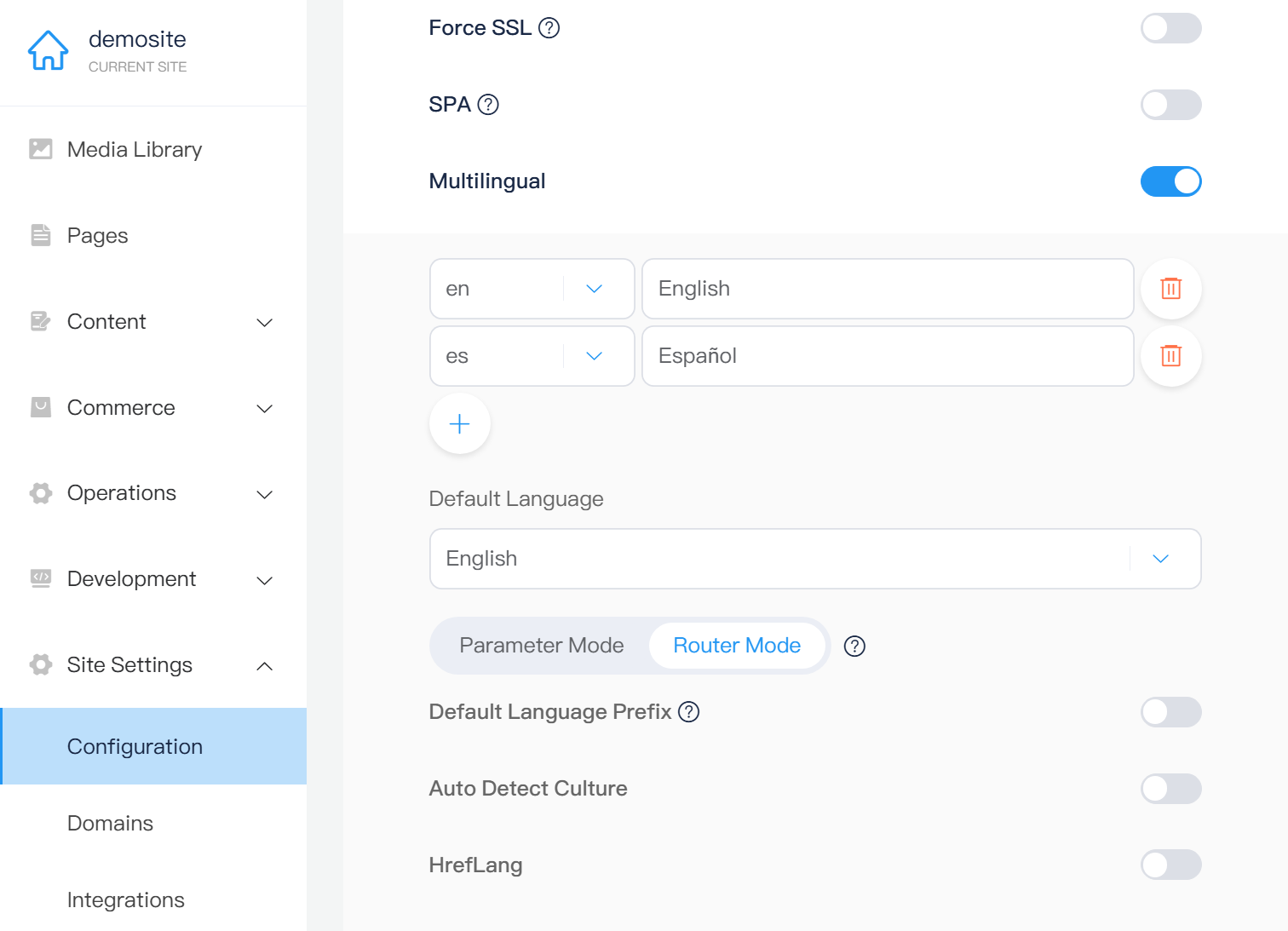
Once the setting is saved, the website has one shared culture model. Pages, Labels, structured content, server rendering, routing, and KScript can all use the current language.
Step two: scan the website instead of finding every sentence manually
An existing website may contain hundreds or thousands of pieces of fixed text: headings, buttons, navigation labels, form hints, image descriptions, and messages. Finding and converting them by hand is one of the most expensive parts of multilingual migration.
Kooboo's Label manager includes a site scanner.
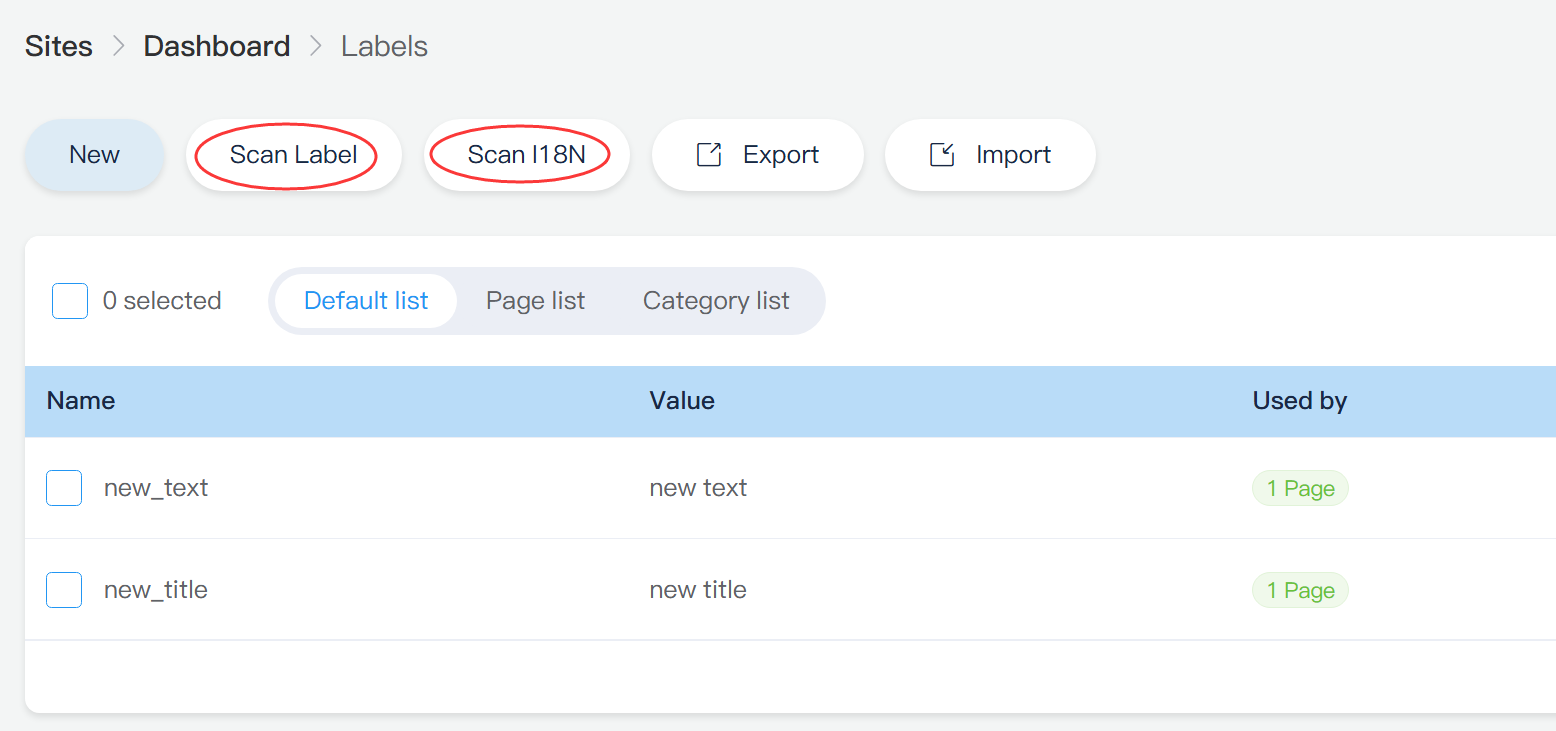
Scan Labels inspects supported DOM-based website resources and identifies text that has not yet been connected to the translation system. It can discover:
- Visible text inside HTML elements
titleattributesplaceholderattributesaltattributes- Text in Pages, Layouts, Views, and other supported DOM resources
The results show the source object, original value, attribute, and a suggested editable Label key. Select the items you want to translate and confirm the conversion.
Kooboo then does the structural work:
- Creates the Label with the original text in the default language
- Adds
k-labelto normal text elements - Adds a Label-backed binding for translatable attributes
- Updates the original website object
- Records the relationship between the Label and its source
The separate Scan I18N workflow finds existing t(...) translation calls inside supported DOM-based resources and can add missing Label entries. This is useful when parts of the site already use translation calls but the central Label collection is incomplete.
Kooboo does not ask you to remember where every sentence lives. It scans the website, shows you the candidates, and converts the approved text at its source.
One translation system for HTML, attributes, JavaScript, and APIs
Labels are designed for reusable interface copy: headings, buttons, field hints, status messages, short paragraphs, and other text that belongs to the website experience.
Each Label has one stable key and a value for every enabled language.
Translate normal HTML text
<h1 k-label="hero_title">Build for the whole world</h1>
<p k-label="hero_description">One website, every language.</p>
<a href="/contact" k-label="contact_us">Contact us</a>
During rendering, Kooboo replaces the element content with the value of that Label in the current culture.
Translate HTML attributes
Inputs and accessibility attributes need translated values too. Use k.label(...) through an attribute binding:
<input k-attribute="placeholder k.label('search_placeholder')">
<button k-attribute="aria-label k.label('open_menu')">
  <span aria-hidden="true">☰</span>
</button>
The same approach works for title, aria-label, alt, and other values that should follow the selected language.
Translate messages in server JavaScript and APIs
k.api.post((body) => {
  return {
    success: true,
    message: k.label("order_created", {
      orderNo: body.orderNo
    })
  };
});
Label values can contain parameters such as {name} or {orderNo}. Kooboo resolves the current language and inserts the runtime values before returning the message.
For existing literal text, k.t(...) provides a fast path into the same Label system. If the Label does not yet exist, the current implementation can create it automatically.
Step three: add a language switcher with one KScript API
A language switcher must do more than list language names. Every option needs the correct version of the current URL, using the website’s configured query, path, route, or domain strategy.
Kooboo generates those URLs with:
k.site.multilingual.currentURLs()
The method returns the configured languages with:
key: language codename: display nameURL: the current page in that languageisActive: whether it is the current language
A complete switcher can remain simple HTML:
<nav aria-label="Language selector">
  <script env="server">
    var languageLinks = k.site.multilingual.currentURLs();
  </script>

  <span aria-hidden="true">🌐</span>
  <ul class="language-switcher">
    <li k-for="language in languageLinks">
      <a
        k-attribute="href language.URL; class {'is-active': language.isActive}"
        k-content="language.name">
      </a>
    </li>
  </ul>
</nav>
The icon and visual design remain ordinary HTML and CSS. Kooboo supplies the difficult part: the correct language-aware destination for each option.
The switcher does not need separate logic for query mode, route mode, translated routes, or language-bound domains. It reads the current site configuration at render time.
Step four: choose the URL model that fits the website
There is no single URL strategy that fits every multilingual project. Kooboo supports several models without changing how Labels and content are managed.
Option one: language query parameter
/about
/about?lang=fr
/about?lang=zh
Parameter mode is useful when the existing URL structure should remain unchanged. Kooboo preserves other query parameters and generates lang automatically when the selected culture requires it.
Option two: language path
/about
/fr/about
/zh/about
Route mode places the culture in the URL path. The default language can keep the shorter URL or use its own prefix:
/en/about
/fr/about
/zh/about
The default-language-prefix setting controls which style Kooboo generates.
Option three: translated page routes
A language does not always need to share the same slug. Pages can have culture-specific route aliases:
/en/about-us
/de/uber-uns
/fr/a-propos
These routes still point to the same Kooboo Page, but the route records carry their language. Kooboo can resolve the requested culture from the route and use the translated route when it builds alternate-language URLs.
Option four: language-specific domains
example.com/about
fr.example.com/about
example.cn/about
Kooboo domain bindings can also be assigned a culture. When a language has its own binding, the multilingual URL generator can switch to that domain while preserving the current relative page.
The content model stays the same whether language lives in a query string, a path, a translated route, or a domain.
Internal links automatically stay in the selected language
A common multilingual bug appears after the visitor clicks the language switcher: the first page is translated, but the next internal link silently returns to the default language.
Kooboo’s rendering pipeline prevents that for rendered internal links. A normal link can remain:
<a href="/pricing" k-label="nav_pricing">Pricing</a>Kooboo renders the destination according to the current multilingual configuration. In path mode it can become /fr/pricing. In parameter mode it can become /pricing?lang=fr. The author does not need to duplicate the navigation for each language.
Programmatic navigation should use the same multilingual URL service:
// Keep the current language
var cartUrl = k.site.multilingual.getUrl("/cart");
k.response.redirect(cartUrl);

// Generate a specific language destination
var frenchProducts =
  k.site.multilingual.getLangUrl("/products", "fr");
Use currentURLs() to switch the current page, getUrl(...) to keep the current language during navigation, and getLangUrl(...) when both the destination and language are explicit.
This avoids hardcoded /en/... paths and manually assembled ?lang=... parameters that break when the site’s URL strategy changes.
Kooboo can choose the right language for the visitor
When automatic detection is enabled, Kooboo can select a culture from the visitor’s request and site configuration.
The request pipeline considers explicit culture information first, including the language query parameter or language route. It can then use the signed-in user’s language, browser Accept-Language preferences, regional information, and finally the website’s default culture.
When a visitor explicitly selects a non-default language, Kooboo can remember that choice with the site-culture cookie.
The result is predictable:
- Explicit language URLs remain authoritative.
- Returning users can keep their selected language.
- New visitors can receive a suitable language automatically.
- The configured default remains the safe fallback.
Multilingual SEO is part of rendering
A translated page is not complete until search engines can understand the relationship between its language versions.
Kooboo handles two important pieces automatically.
The document language
When Kooboo renders the page, it writes the current culture into the HTML language attribute:
<html lang="fr">Alternate-language URLs
When HrefLang is enabled, Kooboo builds alternate URLs for the page’s configured cultures and emits them through the HTTP Link response header. The default culture also receives an x-default alternate.
<link rel="alternate" hreflang="en" href="https://example.com/page" />
<linkrel="alternate"hreflang="es"href="https://example.com/es/page"/>
<link rel="alternate" hreflang="x-default" href="https://example.com/page" />
Because this uses the same route and URL services as the website, the SEO alternates can follow translated routes, language paths, query parameters, and culture-specific domains.
Editors do not need to maintain a separate matrix of language URLs in every page template.
Labels translate the interface; culture-aware content translates the business data
Labels are ideal for fixed website copy. Longer and structured information—articles, product descriptions, catalog values, and content records—belongs in Kooboo’s content and commerce models.
Those models can store values by culture. During a request, Kooboo knows the active culture before the data query and template are executed. The content reader can select the requested language and the fields needed for the page, with the default culture available as a fallback.
This has an important performance benefit: the server does not need to send every translation to the browser and ask client-side JavaScript to choose one. Kooboo reads and renders the language needed for the current request.
One content structure. One page template. One request culture. Only the language needed for this visitor is rendered.
AI can help multilingualize the real website
Because multilingual settings, Labels, Pages, Views, Layouts, content, and routes are real Kooboo objects, AI can work with the same system instead of generating a disconnected translated copy.
AI can inspect the enabled cultures, update site language settings with approval, find and create Labels, fill language values, update the source templates, and verify each language through the website preview.
The site remains editable after AI has helped. Translators can maintain Label values in the CMS, developers can use KScript, and content editors can update culture-specific records without regenerating the website.
What Kooboo removes from multilingual development
- No duplicate website for every language
- No plugin required to introduce the culture model
- No manual search through every Page and View for visible text
- No separate translation mechanism for HTML, attributes, and API messages
- No hand-built language switch URLs
- No duplicated navigation for each language
- No hardcoded route prefixes throughout the templates
- No manually maintained HrefLang list on every page
- No need to send every language to every browser
One switch turns on an entire multilingual system
Enabling multilingual support in Kooboo does more than add another field to the CMS. It activates a shared culture model across the complete website:
- CMS settings define the languages and URL behavior.
- Label scanning converts existing interface text.
- Labels and content store the translations.
- KScript generates switchers, links, messages, and redirects.
- The renderer carries culture through HTML and internal URLs.
- The router supports parameters, language paths, translated routes, and culture-bound domains.
- The SEO layer publishes language and alternate-page information.
That is why turning a Kooboo website into a multilingual website can be so simple. The platform is not attaching translations to the edge of the site. Multilingual behavior is built into the path from request to content to rendered response.
Enable the languages. Scan the website. Add the translations. Kooboo takes care of how every visitor reaches the right version.