


Most website marketplaces give you a design. Most application marketplaces give you a plugin. Most SaaS marketplaces give you another subscription.
Kooboo can give you the complete website or web application.
A Kooboo package can contain the pages, layouts, reusable views, scripts, styles, content, database structures, records, files, server-side JavaScript, APIs, jobs, forms, modules, multilingual resources, and configuration that make the application work. The package travels as one portable ZIP file and can be installed into another Kooboo instance as a real, editable website.
This is not a mockup, and not a template waiting for integration. This is the live website.
See it. Name it. Run it.
The installation workflow is deliberately short:
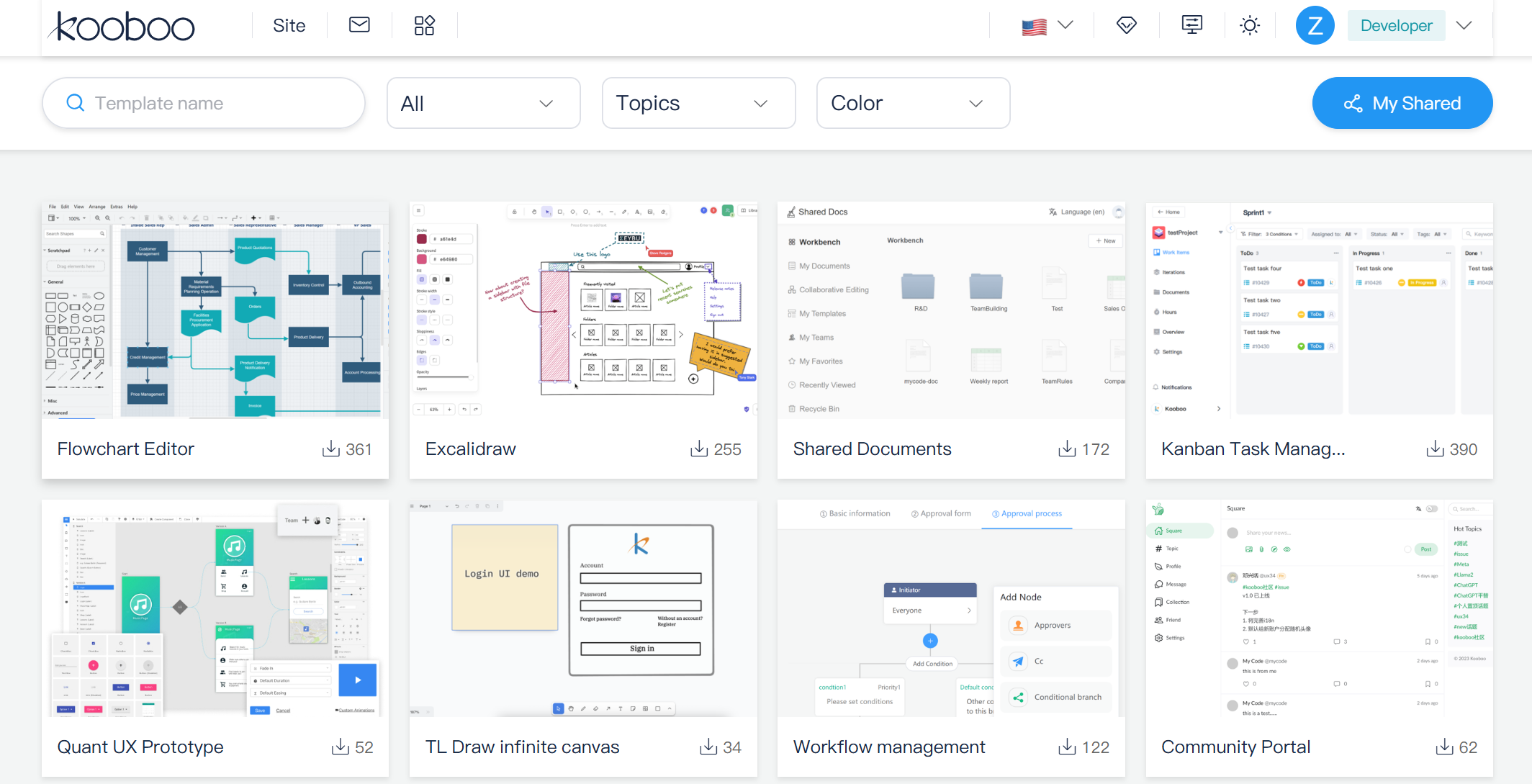
- Open the Marketplace from the Kooboo administration interface.
- Search or browse for a website, application, template, or tool.
- Open its detail page and review the description, author, screenshots, package information, and download count.
- Enter the name and domain for your new site.
- Click to create it.
Kooboo downloads the package, creates a new website in your organization, imports its objects and data, assigns the requested domain, and makes the installed result available as a normal Kooboo site.
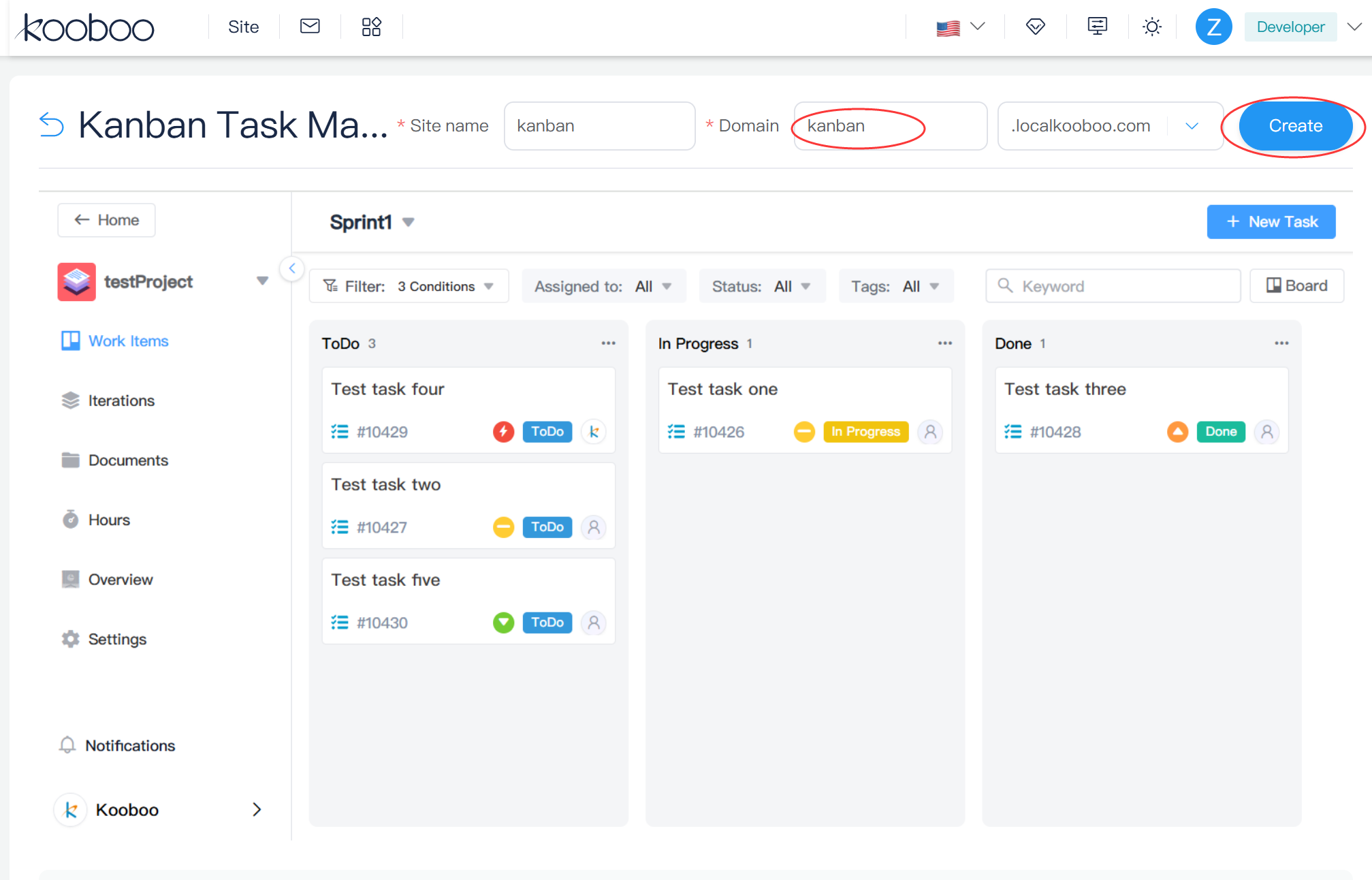
There is no separate database installer to find, no second application server to configure, and no repository of generated code that must first be assembled into a production system. The package is restored into the same Kooboo runtime in which it was built.
One file bridging the gap between 'I found it and 'I can run and edit it'.
Complete, fully functional website—one portable ZIP.
Traditional web applications are scattered across repositories, build outputs, database dumps, storage buckets, environment files, server configurations, deployment scripts, and third-party services. Sharing the application means documenting how all those parts should be reconstructed.
Kooboo starts with a different architecture. A website is a connected collection of known website objects managed by one platform. Because Kooboo understands those objects, it can serialize them into a portable package and rebuild them in another Kooboo instance.
A complete export can include:
- Website structure: Pages, Layouts, Views, routes, menus, forms, and HTML blocks
- Design and browser behavior: Styles, Scripts, images, media, and files
- Content: content types, content folders, records, Labels, and multilingual resources
- Application logic: server Code, APIs, request hooks, scheduled jobs, and Script Modules
- Data: Kooboo database table definitions and records, including application key-value data
- Application resources: file storage, module files, commerce data, and selected site configuration
- Platform behavior: authentication objects, OpenAPI definitions, forms, and other supported website resources
The result is not tied to one developer’s computer. The ZIP can be downloaded, archived, sent to another person, imported into a different Kooboo installation, or published through the Marketplace.
Package everything—or only the parts you share.
Not every reusable solution should become a complete new website. Sometimes a developer wants to share a set of pages, a multilingual content model, an application module, a group of forms, or a database-backed feature.
Kooboo therefore supports two export approaches:
- Complete export packages the website or application as a complete portable site.
- Custom export lets the creator select the categories of website objects that belong in the package.
The custom export interface can select Pages, Views, Layouts, images, Scripts, Styles, content, Labels, menus, databases, server Code, authentication, files, jobs, request hooks, Script Modules, forms, OpenAPI objects, multilingual resources, and site configuration.
This makes the same portability system useful at several levels:
- Share a complete ecommerce website.
- Distribute an internal CRM or HR application.
- Move a reusable feature between projects.
- Deliver a customer project as one installable package.
- Back up a working application as one portable artifact.
- Publish a product to the Kooboo Marketplace.
Kooboo understands the dependencies inside the package
Exporting selected objects is more difficult than placing files into a ZIP. A page may require a route. A content record requires its content folder and content type. A form requires its form settings. An OpenAPI definition may require its authorization configuration.
Kooboo's package builder handles important dependencies automatically:
- Routes are included with routable website objects.
- Form settings are included when Forms are selected.
- Authorization information is included with OpenAPI resources.
- Content categories are included with structured content.
- Content folders and content types are included when their records need them.
- Script Module files are copied with the corresponding module objects.
During installation, Kooboo identifies the package format, restores objects in a defined order, recreates module URLs, applies table definitions, imports records, restores supported files, and rebuilds the search index when the imported configuration requires it.
True portability. Kooboo understands the application structure—it doesn't just zip a folder of static files.
Dynamic applications remain portable
A static template is easy to copy. A working application is harder because it has data.
Kooboo can package its internal database table definitions and records together with the website objects that use them. When the package is installed, the destination Kooboo instance recreates the tables and imports their data.
This is why the Marketplace can distribute more than marketing websites. A package can contain a working business application with its own screens, server logic, data model, APIs, files, and initial data.
For applications intended to be widely shared, Kooboo recommends portable storage such as its built-in IndexedDB engine or SQLite. An application that depends on a separately installed MySQL, SQL Server, or MongoDB service is no longer self-contained.
The sharing workflow checks for common external database connection settings and warns the creator when sensitive connection information may be present. That protects against accidentally publishing a package containing an external database credential, but creators should still review every package for secrets, private customer data, API keys, licenses, and environment-specific settings before sharing it.
Popular JS tools, pre-ported to Kooboo. Install in one click.
Many of the world's most useful browser tools are built with HTML, CSS, and JavaScript. They are often distributed across different websites, accounts, subscriptions, and file-storage systems. Users must remember where each tool lives and how each one opens, stores, and exports its work.
Popular JavaScript-based tools have been created by community and submitted to Kooboo marketplace. This is not an automatic conversion of every JavaScript project. Each selected tool is integrated deliberately for Kooboo, and connected to a universal interface for opening and saving files through Kooboo storage.
Once integrated, the application becomes one click away inside Kooboo. Users can install it, open it from the same working environment as their other Kooboo applications, and keep its files in a consistent storage workflow.
There are hundreds of searchable packages, including popular browser applications and libraries such as:
- Flowchart editor originally from draw.io
- Excalidraw and tldraw
- Quant-UX and Polotno Studio
- GrapesJS and VvvebJs
- Unlayer and Toast UI tools
- Mermaid diagramming
- Spreadsheet, image-editing, API-testing, SVG, database-modeling, and design tools
The difference for the user is immediate: instead of moving between many SaaS products at many different URLs, the user can access a growing collection of tools through one Kooboo environment. Kooboo provides a common place to discover, install, open, and use them.
Every package currently is free. The Marketplace also supports a paid-product model. In the future, software creators and SaaS vendors will be able to use Kooboo as a distribution channel for their own applications, offering users one-click installation while choosing a free or paid publishing model.
Bringing production-ready business software to the Marketplace.
Kooboo packages are not limited to design utilities. The same model can distribute complete business applications.
Kooboo has built applications covering areas such as:
- Customer relationship management
- Enterprise resource planning
- Human resources and employee administration
- Online chat and customer support
- Domain email and email marketing
- Sales leads and membership management
- Bookkeeping, purchasing, and expense management
- Time tracking, after-sales service, and asset inventory
These applications can use the same Kooboo capabilities described throughout this series: server-rendered HTML, server-side JavaScript, databases, authentication, multilingual content, online debugging, inline editing, analytics, automation, and AI assistance.
That is strategically important. The Marketplace does not add an unrelated store beside Kooboo. It distributes the same websites and applications that Kooboo already knows how to build, run, inspect, edit, publish, and operate.
A carefully selected collection in every category
The Marketplace is organized around four important categories: websites, ecommerce, tools, and applications. For each category, Kooboo selects twelve especially strong packages to feature as clear starting points.
These featured packages are selected for design quality, usefulness, and the completeness of the installed result. Website and ecommerce packages are prepared as real Kooboo sites, while featured tools and applications are ready to install and use through the same Marketplace workflow.
Users can still search the complete catalog of hundreds of packages. The featured twelve in each category provide a simpler place to begin without hiding the depth of the full Marketplace.
Because each starting point is a real Kooboo package, the user can:
- Install it as a complete website.
- Ask AI to rewrite the design and content.
- Edit any real element with Kooboo’s source-aware inline editor.
- Change Pages, Views, Layouts, data, and JavaScript in the online IDE.
- Add commerce, multilingual content, forms, APIs, or custom business behavior.
- Export the finished result and run it in another Kooboo instance.
The template is not the final product. It is a complete, working starting point that you are free to transform.
Build once. Share with the community.
Every Kooboo creator can participate in the same cycle.
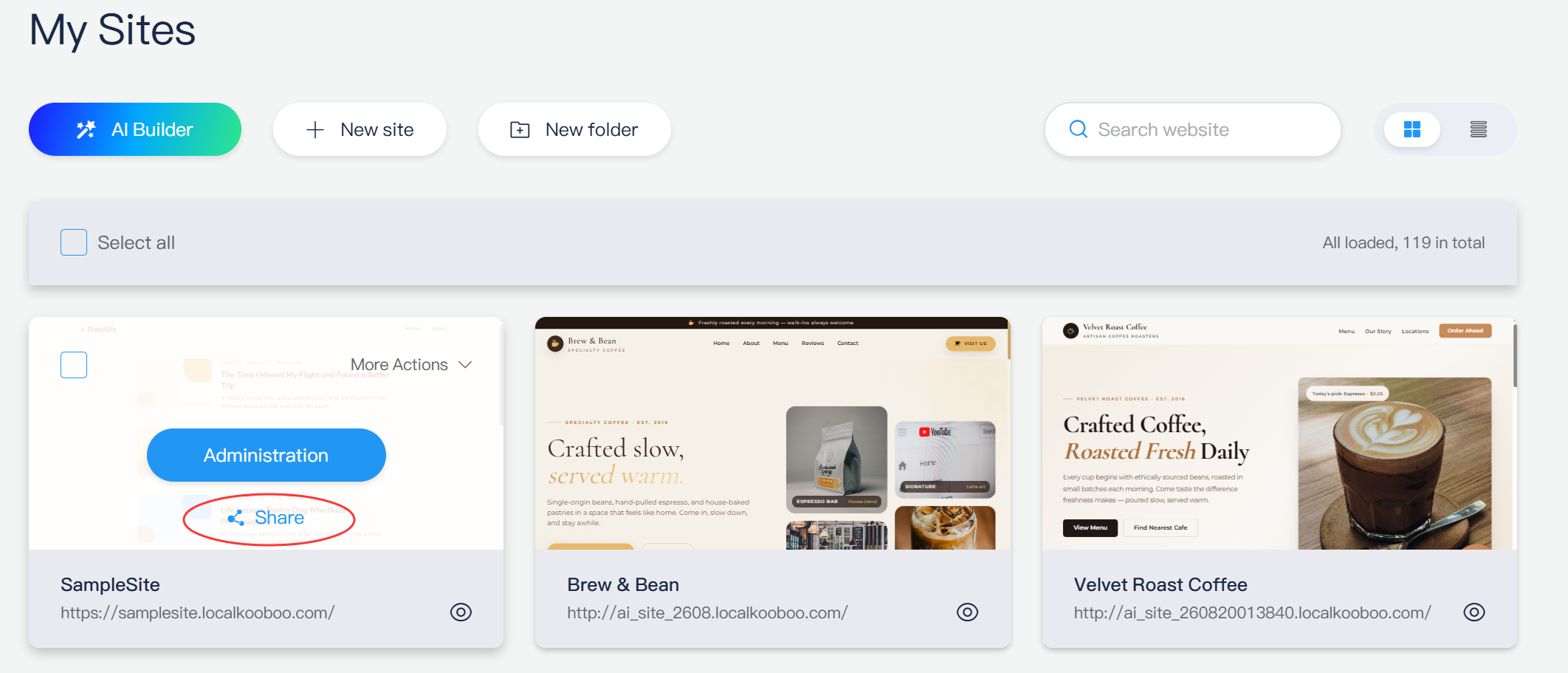
From the website list, choose Share. Add the package name, type, cover image, screenshot, price, currency, and supported language metadata. Kooboo exports the application and sends its package and listing information to the Marketplace.
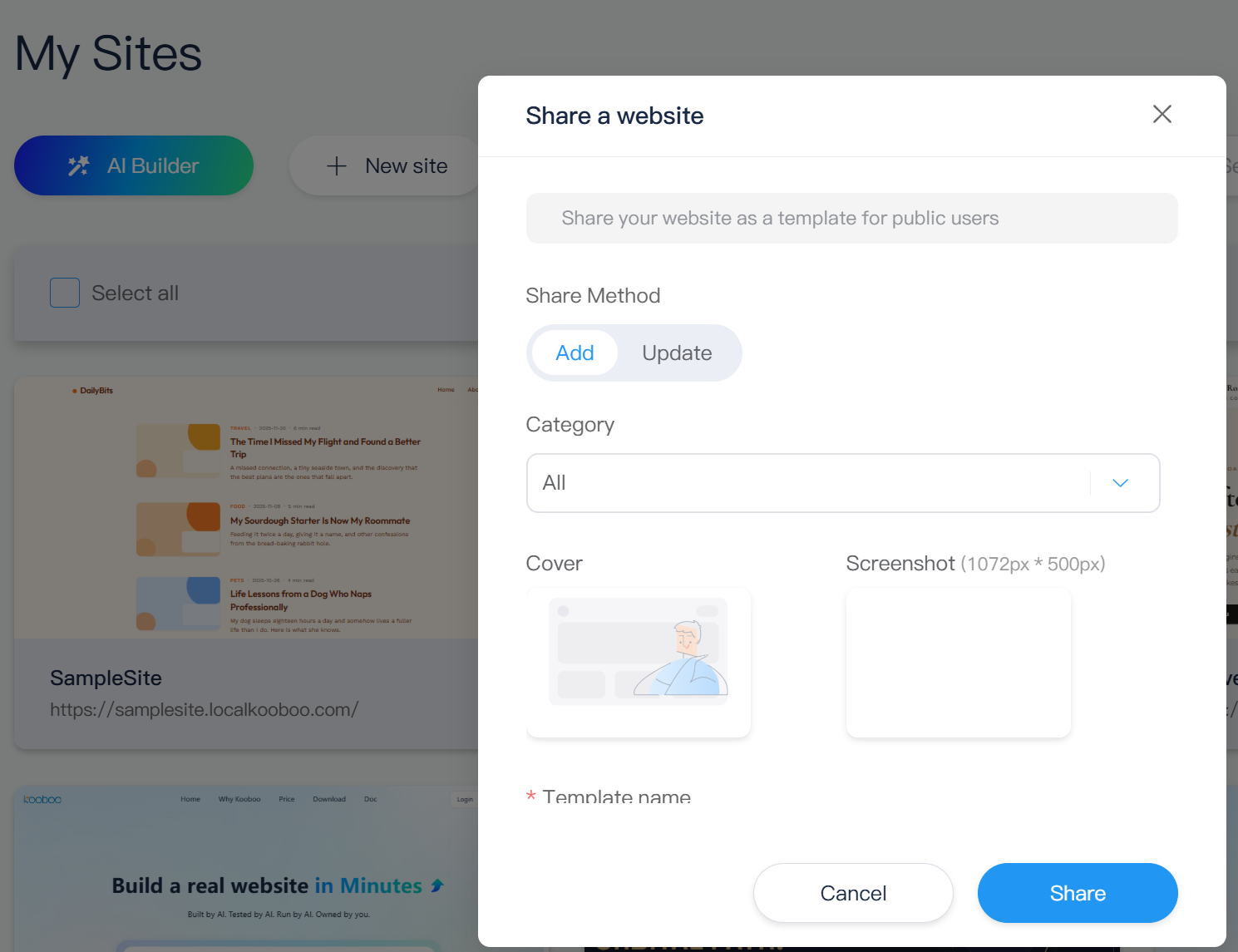
Creators can publish a free package or use the Marketplace's paid-product model by assigning a price and currency. Existing listings can be updated with new metadata, screenshots, or application binaries as the product improves. Packages currently published by the Kooboo team are offered free.
For users who already have a ZIP instead of a website in the current Kooboo instance, the sharing interface can import that package temporarily, prepare the Marketplace item, and remove the temporary site afterward.
Ecosystem discovery, built directly into your workspace
The Marketplace is available from the Kooboo administration interface. Users do not need to leave the platform, download an unknown archive, locate an installation guide, and return later to assemble it.
The Marketplace is available where users are already building and managing their websites.
The catalog supports keyword search, application types, categories, visual filters, detail pages, screenshots, download counts, and package statistics. Kooboo’s current packages are free, while the Marketplace is also designed to support member and paid products from future publishers.
This shortens the complete adoption path:
- Discover a solution.
- Understand what it contains.
- Install it into your own environment.
- Open the working result.
- Customize the real source, data, and design.
- Publish it under your own domain.
- Export it again whenever you want.
Installed does not mean locked
Some marketplaces make installation easy but ownership difficult. The customer receives an account, a limited configuration panel, and permission to use the service for as long as the subscription continues.
A Kooboo Marketplace installation becomes a normal Kooboo website in the user’s organization. Its Pages, Layouts, Views, content, scripts, styles, files, data, and configuration remain available through the same editing and development tools used to create it.
The user can change the design, rewrite the JavaScript, replace the content model, add new APIs, translate the interface, connect external services, or ask AI to extend the application.
The user can also export the resulting site as another portable package.
One-click installation is convenient. The freedom to inspect, modify, move, and keep the result is what makes it ownership.
A marketplace designed for AI-created software
AI can now create websites and applications much faster than traditional teams, but generated work still needs a reliable way to become a reusable product.
Kooboo already has that unit of distribution: the portable website package.
AI can build a Kooboo site, test the rendered result, improve its real source and data, and prepare it as a package. The creator can review the application, add listing information and screenshots, and publish it to the Marketplace. Another user can install the result into a separate Kooboo instance and continue editing it with AI or by hand.
This creates a complete product loop:
Build → Test → Package → Share → Discover → Install → Customize → Publish → Improve
Every stage works with the same Kooboo website model. There is no need to flatten the AI-created application into a static theme or convert it into a special marketplace-only plugin format.
Welcome to the next-generation Kooboo ecosystem
The Marketplace is more than a convenient download screen. It lets Kooboo developers, agencies, designers, businesses, and AI systems create reusable value for one another.
- Businesses can install complete internal tools and customer-facing websites.
- Developers can distribute applications without inventing a separate installer.
- Agencies can turn proven solutions into repeatable products.
- Designers can publish complete editable websites instead of static mockups.
- AI builders can deliver finished, portable results instead of disconnected code.
- Customers can own and continue developing what they install.
That is the larger promise of the Kooboo Marketplace:
A complete website or application should be as easy to share as a file, as easy to install as an app, and as open to modification as the website itself.