


Building a website is easy when nothing changes.
Real work is different. A developer edits a layout. A content manager changes a page. AI updates several objects. A new version is tested. Production receives the change. Then someone discovers that yesterday’s behavior was better.
Traditional web stacks divide this lifecycle across source control, database backups, deployment scripts, file-transfer tools, staging servers, CMS revisions, and hosting dashboards. Each system knows one part of the story. Restoring the complete application means reconstructing that story under pressure.
Kooboo treats change history, website objects, testing environments, portability, and remote publishing as parts of the same platform.
A production system should make change fast—but recovery faster.
Demo one: change a page, compare it, and undo it
Begin with a working website and make a visible change:
- Edit a heading and one section of a page.
- Open the Action Logs.
- Find the corresponding edit-log item.
- Compare the recorded version with the latest version.
- Undo the change.
- Refresh the website and show the restored result.
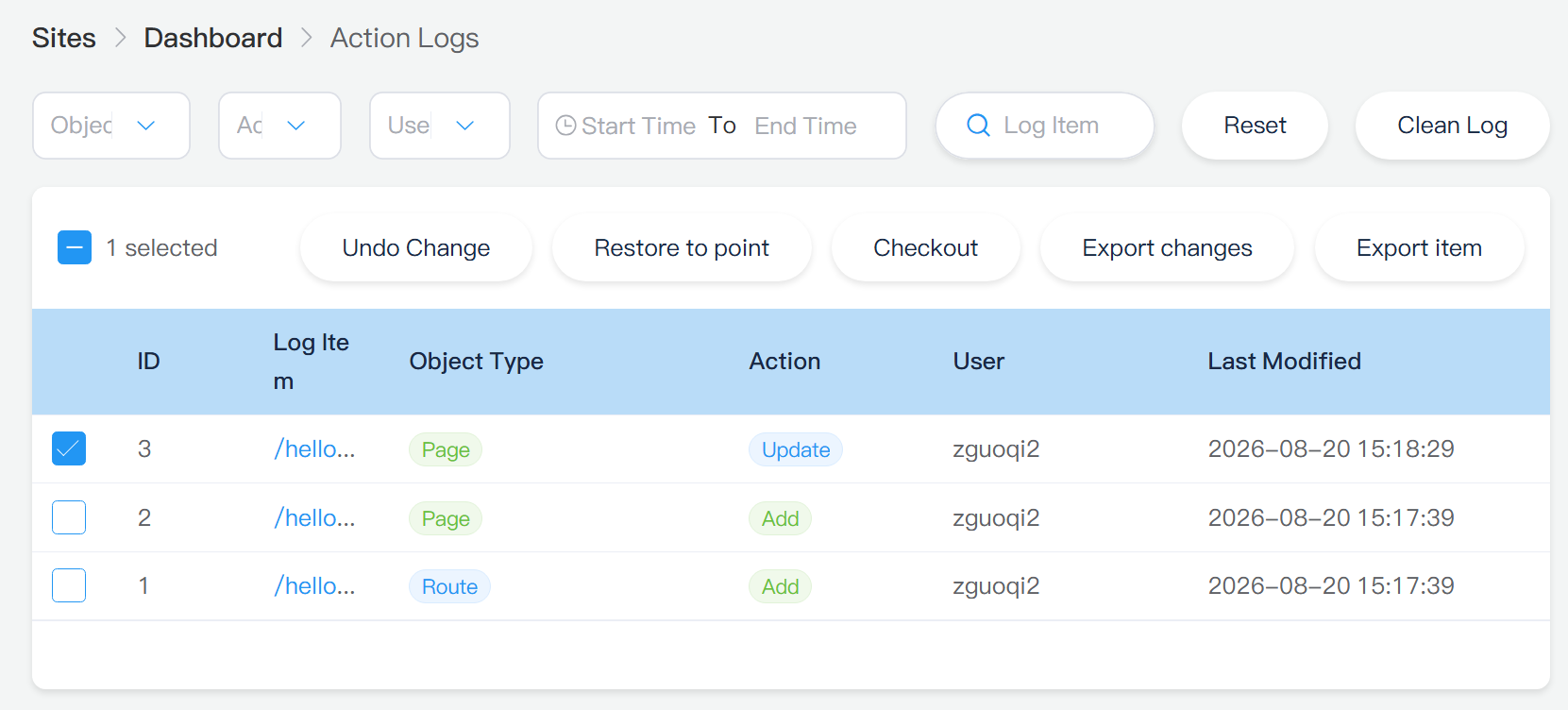
Undo in Kooboo is itself a new change. The platform does not need to erase the historical record to move the object back. The recovery action becomes part of the history that follows it.
Demo two: publish the same website to another Kooboo server
Deployment should demonstrate application movement, not only a copied HTML page.
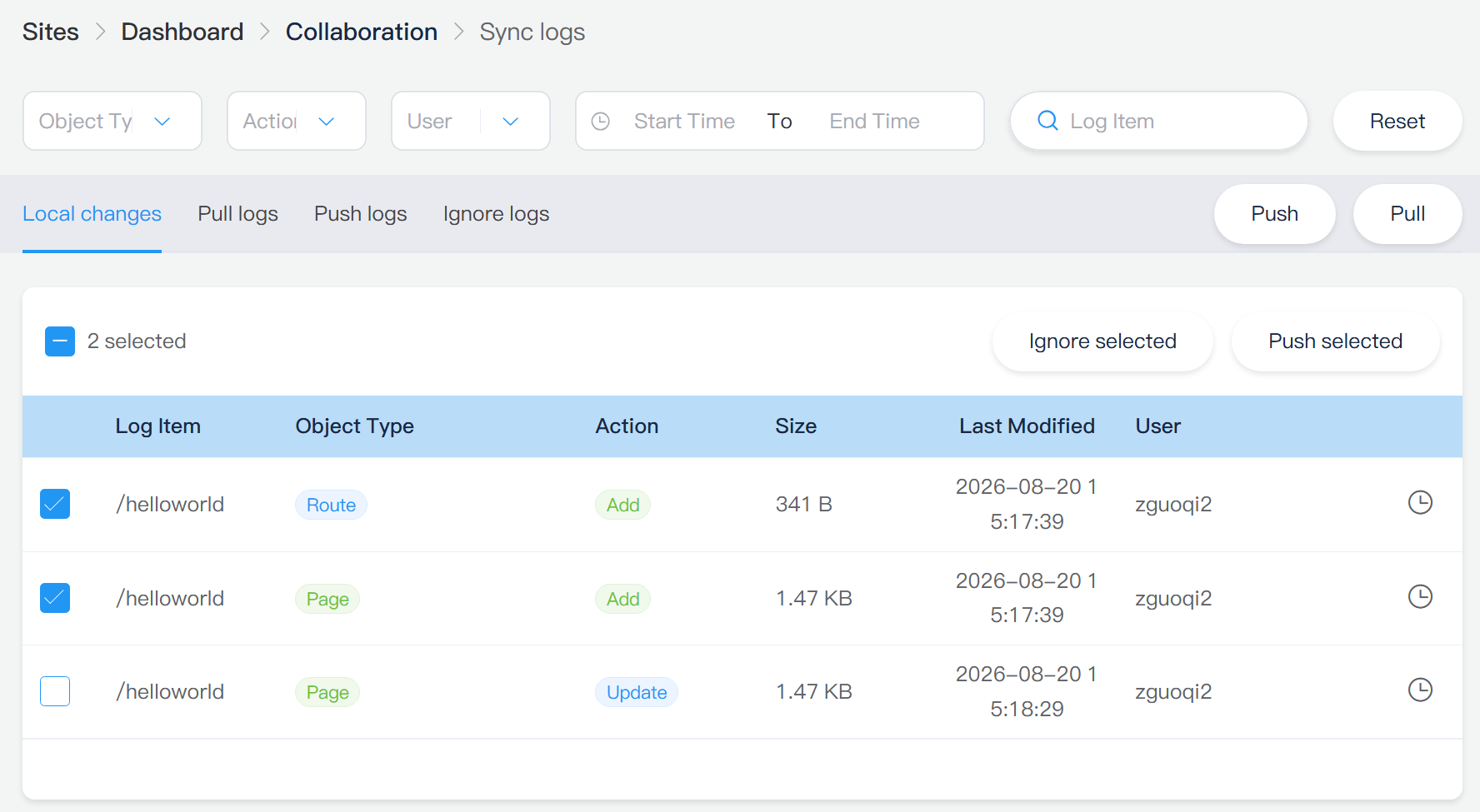
- Configure a remote Kooboo destination.
- Publish the current website changes.
- Show the pages, layouts, views, scripts, styles, data, and routes operating on the destination.
- Make another local change and publish only the new log items.
- Create an intentional conflict and show Kooboo stopping with both sides available for review.
History belongs to the website object
A CMS revision system often remembers only page text. That is not enough for a dynamic application.
Kooboo’s site log records changes across CMS stores and dynamic-table data. History APIs can list recent changes, find the versions of a particular object, retrieve a log item, and compare two recorded versions of the same object.
This applies to the things that actually make the application work:
- Pages, layouts, and views
- Styles, scripts, code, and routes
- Images and website files
- Labels, forms, menus, and HTML blocks
- Content structures and content records
- Supported dynamic-table records
- Other versioned Kooboo site objects
A developer can examine what changed without reducing the application to a page-level timestamp.
Recover at the right scale
Different mistakes need different recovery tools. Kooboo supports several levels.
Undo one change
Select a history item and undo it. Kooboo applies the inverse operation and records the recovery as new history.
Undo a selected set of changes
Several validated log items can be undone together. The current service validates the requested IDs before it begins the rollback operation and places a safety limit on the number accepted in one request.
Restore the website to a log position
Kooboo can roll back later recorded changes until the website returns to the state represented by a selected log ID.
Restore by time
The site can be restored to the last recorded state at or before a specified date and time.
Check out history as another website
Sometimes the safest recovery is not to touch the current website at all. Kooboo can create another website containing the source site’s state at a chosen history log. The historical site can receive its own name and domain and can remain unpublished while it is inspected.
Do not guess what the old website looked like. Open it as a website.
Restore and checkout operations have explicit processing limits in the current implementation. These limits protect the server from unbounded rollback work and should be included in administrator documentation.
AI can use the same history—with approval boundaries
Kooboo exposes structured AI functions for history operations. AI can list history, inspect items, list versions, compare versions, undo selected changes, restore to a log or time, and check out a historical state as another site.
Operations that change state require approval. This is an important distinction between an AI that merely writes code and an AI operating a production platform.
An effective AI workflow can become:
- Inspect the current object and relevant history.
- Explain the difference.
- Request approval for the recovery operation.
- Apply the change.
- Open or request the affected URL and verify the result.
History gives AI a factual record of the application instead of asking it to reconstruct the previous state from conversation alone.
A Sandbox is a real Kooboo website
Kooboo' AI Sandbox creates a separate hidden website inside the organization. It runs through the same Kooboo website model and runtime as the original site.
That matters because many staging environments fail in subtle ways: different framework versions, missing services, different routes, different database assumptions, or deployment-only behavior. Kooboo reduces that class of difference by testing the work as another Kooboo site rather than inventing a separate simulation runtime.
The current Sandbox functions can:
- Create and delete a hidden Sandbox site
- List Sandboxes in the organization
- Copy selected supported object types from the current site
- Run KScript in the Sandbox context
- Evaluate a
<k-data>block - Render a template
- Request and render a Sandbox page while measuring execution time
- Use normal AI editing functions against the selected Sandbox
AI can therefore change an isolated copy, inspect the code, execute server logic, render pages, and use browser control to test the result before the production website is changed.
The testing runtime and production runtime are the same kind of system
Containers became essential partly because development and production environments drift. Kooboo approaches the problem at the application-platform level.
A Kooboo site carries its pages, layouts, views, styles, scripts, routes, content definitions, data, and platform objects. A Sandbox, local instance, hosted instance, and remote Kooboo server use the same application model and universal runtime.
This does not mean operating systems, networks, permissions, domains, or external integrations can never differ. It means the website is not rebuilt from several unrelated framework projects merely to reach another Kooboo environment.
Move the whole application—or the part you need
Kooboo provides more than one movement model because deployment and distribution are not always the same task.
Complete website packages
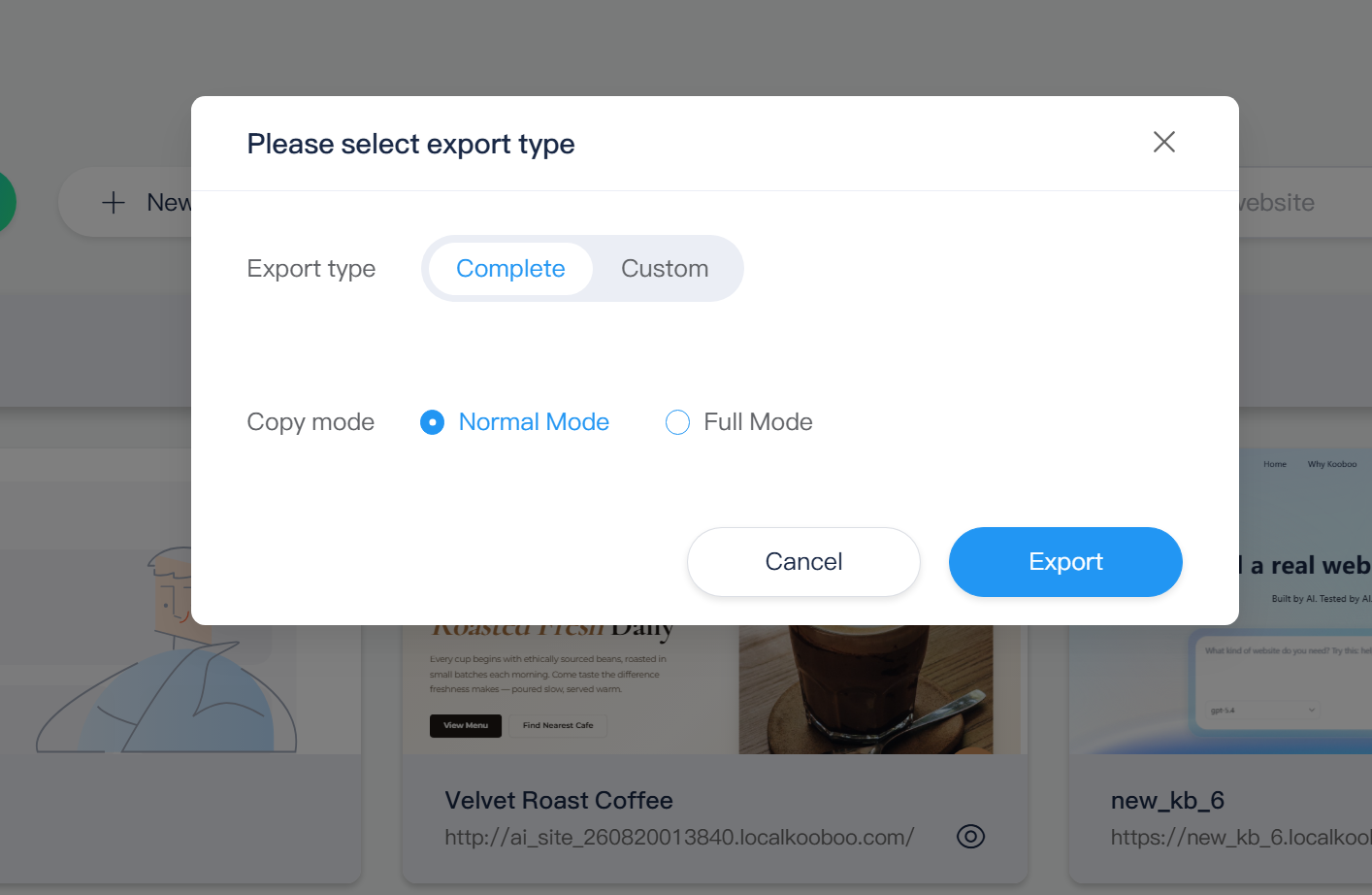
A full Kooboo website can be exported to a portable package and imported as another site. The package can include application objects, dynamic tables, file storage, commerce data, module files, and supported site settings.
Custom object types
Kooboo can export selected stores instead of the entire website.
Selected history batches
Change-log items can be packaged as a batch and imported into another Kooboo site. This provides a deployment unit based on recorded changes rather than copying an entire database every time.
Remote incremental publish
Kooboo remote publishing reads website changes from the sync log and sends them to another Kooboo server in bounded batches. After the initial connection, later pushes can transfer new application changes rather than reinstalling the complete website.
The same service supports pulling remote changes back into the current site.
Conflicts are information—not permission to overwrite
If both local and remote sites have changed the same object, Kooboo’s synchronization service checks for a conflict. A push or pull can stop and return information about the local and remote versions, users, modification times, object bodies, and image status where applicable.
This is safer than treating deployment as blind file replacement. The user can see that the destination has meaningful work before choosing how to proceed.
Remote publish destinations can also define object stores to ignore for outgoing or incoming synchronization. That allows an administrator to keep environment-specific categories out of a particular direction of transfer.
Deployment is efficient because it follows the edit log
A production deployment does not always require scanning and serializing the full website. Kooboo’s remote publisher asks the sync log for pending items, prepares the corresponding typed object, sends it to the remote receiver, and records the acknowledged remote version.
This favors incremental work:
- Transfer the changes that have not yet been published.
- Process them in bounded batches.
- Stop cleanly when finished, when the batch limit is reached, or when a conflict appears.
- Continue later from the recorded synchronization state.
The current implementation uses source-generated JSON metadata for key publishing, synchronization, history, and AI contracts. That supports Kooboo’s NativeAOT direction and avoids making reflection-based serialization a deployment requirement.
History is not a backup strategy by itself
Application history protects against many editing mistakes, but it should not replace independent operational backups. Hardware failure, storage corruption, administrator error, credential compromise, and infrastructure loss require copies outside the active server.
A responsible Kooboo production setup should combine:
- Object and site history for fast operational recovery
- Portable exports for application movement and archival
- Remote publication for controlled delivery
- Independent server and data backups
- Release verification and recovery testing
The strength is not a magical “undo everything” promise. It is the number of useful recovery and movement choices available before a problem becomes a disaster.
One lifecycle for human and AI development
Kooboo brings the application lifecycle into one understandable sequence:
Edit → Record → Compare → Test → Approve → Package or Publish → Verify → Undo or Restore when necessary
Humans can use that lifecycle from the administration interface, inline editor, IDE, CLI, packages, and remote publishing tools. AI can use structured functions against the same website objects, history, Sandbox, and runtime.
The fastest development platform is not the one that never makes a mistake. It is the one that makes every change visible, testable, movable, and recoverable.