


Web development has become powerful—but the list of skills required to deliver one working website has grown out of control.
A modern project may ask for HTML, CSS, JavaScript, a frontend framework, a backend language, an API framework, a database layer, a build system, containers, deployment pipelines, cloud configuration, monitoring tools, and an AI assistant that still needs the architecture explained to it.
Kooboo takes the opposite approach.
Instead of asking people to learn more technologies before they can finish a website, Kooboo reduces the skill set required at every level:
- Describe It, and AI Builds It.
- HTML Is All You Need for Data-Driven Sites.
- JavaScript Unlocks Complete Customization.
More Capability, Less Complexity
The real innovation: fewer skills are needed to finish the job
Many platforms make one stage of development easier. A page builder helps with layout. A backend service helps with data. A code generator writes a starting point. A container packages the runtime. A deployment service moves the result.
The developer is still responsible for joining those stages into one working system.
Kooboo reduces the number of stages, tools, and specialist roles required in the first place. The editor, website model, template engine, server-side JavaScript runtime, databases, content system, preview, debugger, history, publishing, and AI all work with the same website.
That produces three unusually accessible development levels.
Level one: Prompt AI to Build Complete Dynamic Sites
Kooboo AI is designed to finish a website—not stop after generating a screenshot, a landing-page mockup, or a folder of code that somebody else must integrate.
It can work across the real objects that make up the site:
- Pages, Layouts, and reusable Views
- Styles and browser-side Scripts
- Structured content and multilingual values
- Forms, menus, labels, HTML blocks, files, and images
- Server-rendered data queries
- Server-side JavaScript, APIs, and reusable CodeBlocks
- Database and commerce objects
- Preview, browser behavior, diagnostics, and verification
The goal is a website that runs, not merely code that looks plausible. AI can create the site, inspect the rendered result, identify errors, revise the source, and verify the visible behavior. For experimental work, it can use an isolated Kooboo Sandbox before approved changes are applied to the working site.
This is the promise behind:
Built by AI. Tested by AI. Run by AI. Owned by you.
A business owner can begin with an idea instead of a technology stack. A designer can begin with the experience instead of a repository. A developer can ask AI to perform the repetitive work while retaining access to every underlying website object and line of code.
Level two: Build Dynamic Apps with Basic HTML
Most systems require a major conceptual jump between a static HTML page and a real data-driven website. The moment a page needs content from a database, the developer is expected to introduce APIs, JSON, asynchronous browser requests, state management, and usually a JavaScript framework.
Kooboo lets the page remain HTML.
<k-data>
  <query as="blogs" source="content" resource="BlogFolder" action="list" export>
  </query>
</k-data>

 <div k-for="blog in blogs">
   <h2 k-content="blog.title"></h2>
   <p k-content="blog.summary"></p>
 </div>
This is a dynamic blog list. Kooboo executes the <k-data> query on the server, binds the result to the HTML template, and sends the completed page to the browser.
There is no separate endpoint to create for the first render. There is no JSON response to fetch and convert back into HTML. There is no client-side application framework required just to show database or content values.
The <k-data> model can query structured content, commerce data, culture-specific values, SQLite, MySQL, SQL Server, IndexedDB, and request inputs. HTML attributes such as k-for, k-content, k-attribute, and k-if bind and control the output.
Queries, variables, mapping, conditions, error handling, and redirects can all be expressed with tags and attributes. An HTML author can build a product catalog, multilingual content site, directory, publication, campaign, or other fully data-driven website without first becoming a backend programmer.
In Kooboo, HTML is not limited to describing a static page. HTML can describe the complete server-rendered data flow.
Level three: Remove All Ceilings with JavaScript
Declarative HTML is ideal when the page follows a normal query-and-render flow. When the website needs custom business rules, APIs, authentication, integrations, calculations, automation, or application behavior, JavaScript takes over.
JavaScript already runs in the browser. Kooboo also runs JavaScript on the server.
<script env="server">
  // Familiar JavaScript, executed during server rendering.
  var greeting = "Hello from the Kooboo server";
</script>
Adding env="server" explicitly tells Kooboo to execute that script on the server. The server-side script is not sent to the browser.
For reusable application logic, developers can create server CodeBlocks and use module imports:
<script type="module" env="server">
  import { calculatePrice } from "./Services.pricing";

  // Custom server-side application logic belongs here.
</script>
The language remains familiar while the platform provides the server capabilities: requests and responses, APIs, content, databases, files, cache, cookies, sessions, security, outbound HTTP, WebSockets, email, payments, commerce, jobs, and external services.
A JavaScript developer is not restricted to a collection of approved widgets. The developer can create the data model, server behavior, APIs, browser experience, and integrations required by the application.
The development model becomes easy to remember:
- HTML for structure, templates, and server-rendered data flow
- CSS for presentation
- Browser JavaScript for client interaction
- Server JavaScript for custom backend logic
There is no mandatory switch to a second programming language and no mandatory handoff to a separate backend project.
One developer can do the work that normally waits between two teams
The traditional frontend and backend split creates a waiting line. The frontend developer requests data. The backend developer designs an endpoint. Both sides agree on the contract. The backend is deployed. The frontend integrates it. A mismatch is discovered. The cycle begins again.
Kooboo removes that handoff from the critical path.
One JavaScript developer can own the complete request—from the HTML and browser interaction to server rendering, API logic, database access, and the final response. An HTML-focused developer can complete many dynamic sites without requiring that API at all. AI can perform work across both sides.
Backend expertise still matters for difficult security, architecture, and transaction decisions. But a second specialist is no longer required for every form, query, content list, dashboard, or internal API.
Productivity increases because Kooboo removes entire categories of coordination—not because it merely helps people type code faster.
Build, Run, and Debug in One Universal Kooboo Runtime
Skill reduction is only half of the story. Kooboo also reduces environment differences.
A common source of failure is that development, testing, and production are assembled differently. Different runtimes, package versions, operating assumptions, environment variables, build outputs, and service configurations create the familiar problem: “It worked on my machine.”
Containers such as Docker address this by packaging an application together with its runtime dependencies. Kooboo attacks the same class of problem at the platform level: the website objects, template engine, JavaScript runtime, data access model, debugger, and production server are already parts of one Kooboo runtime.
The Page you edit is the Page Kooboo renders. The View you debug is the View the site uses. The server JavaScript you test runs through the same execution model used by the published website.
There is no requirement to rewrite the online project into a different production framework. There is no separate application server to reconstruct simply because the website is ready to go live.
Debug the running site—not a simulation of it
Kooboo Developer Mode works with a running website. Developers can edit a resource, preview the real result, inspect browser errors and network activity, and debug server-side JavaScript inside the same platform.
The online server debugger supports:
- Breakpoints
- Continue, step into, step over, and step out
- Variable and exception inspection
- Expression evaluation while execution is paused
- TypeScript source mapping
- Execution across multiple server files
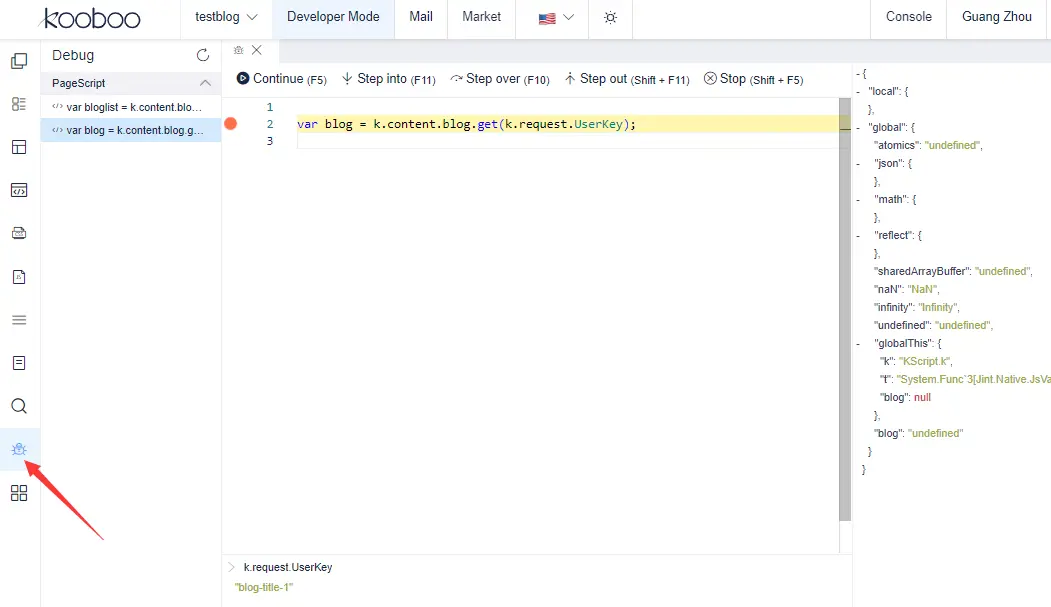
For changes that should not be made directly on an important live site, the same runtime can be used through a separate Kooboo site, sandbox, or test environment. Because the website remains a Kooboo package, it can move without changing its development model.
A website is portable as a package—and publishable as individual objects
Kooboo does not treat deployment as one indivisible server image.
A complete website can be exported as a ZIP package and imported into another Kooboo instance. Selected resource groups can also be exported and imported. This makes the website portable for backup, transfer, testing, and delivery.
For connected environments, Kooboo can publish and synchronize changes at the website-object level. A change can be a Page, Layout, View, Style, Script, API, CodeBlock, image, content item, table record, or another supported site object.
The publishing system tracks outgoing and incoming differences, pushes and pulls objects between Kooboo sites, records versions, and detects conflicts. Teams can review what changed instead of redeploying everything for every update.
This creates several deployment choices:
- Export and import the whole website when you want a portable site package.
- Export selected resources when only part of the website should move.
- Remote-publish individual changes between connected Kooboo environments.
- Push or pull differences while retaining version and conflict information.
Development, testing, and production can run the same website objects on the same Kooboo runtime. Deployment becomes movement—not reconstruction.
Start instantly in the browser
The online IDE is the fastest way to begin. Open Developer Mode and work directly with the resources of the current website: Pages, Layouts, Views, Styles, Scripts, server Code, forms, menus, modules, data, preview, and debugging.
The editor is built with Monaco Editor and adds Kooboo-aware intelligence for JavaScript, TypeScript, server APIs, modules, and website data.
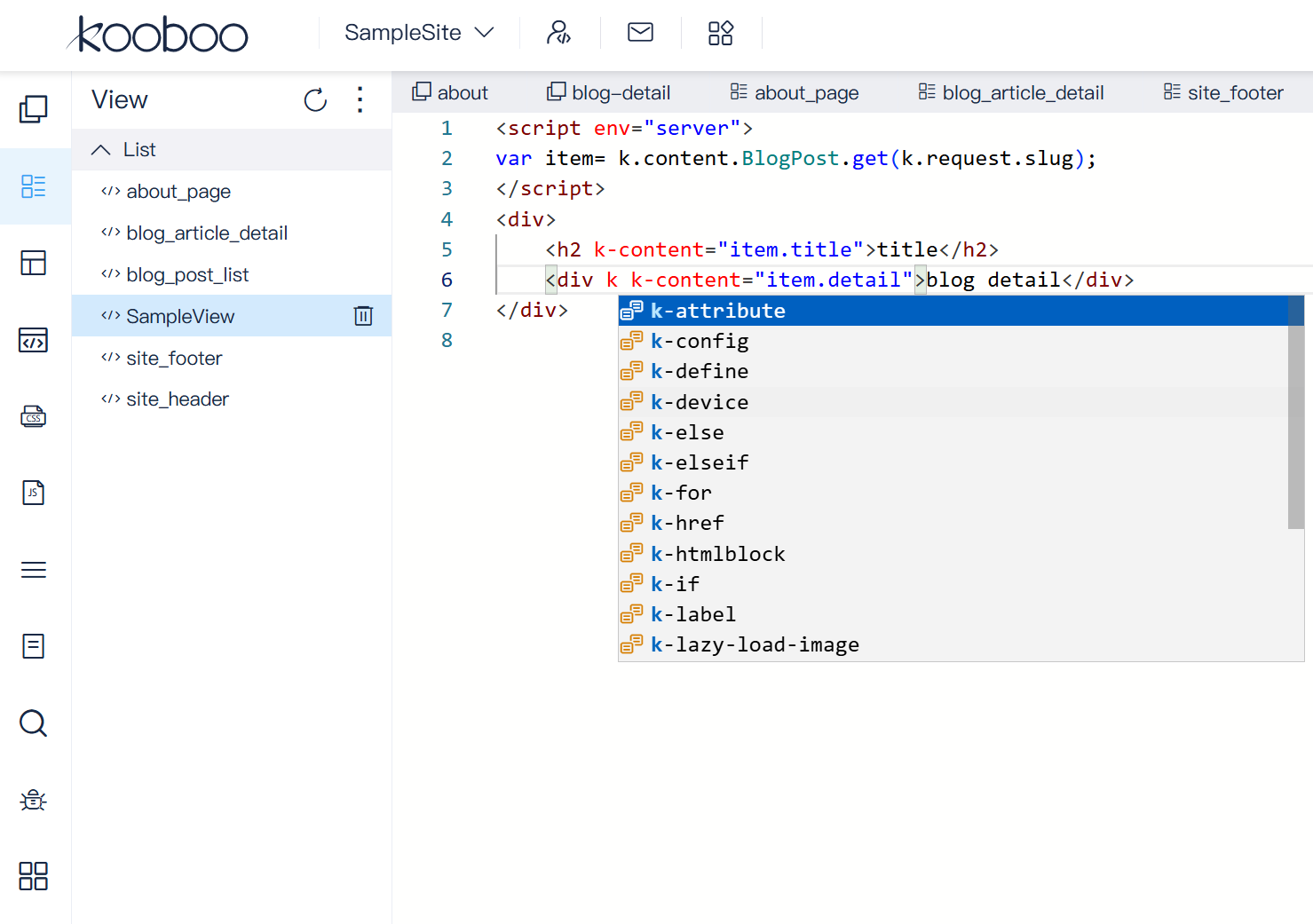
No local runtime or database setup is required to begin. Save a resource and preview it against the running website.
Prefer Visual Studio Code and Git? Use the Kooboo CLI
Some developers want the zero-setup browser workflow. Others prefer local files, Visual Studio Code, Git branches, terminal commands, and their existing development extensions.
The upcoming Kooboo CLI supports that workflow without creating a second platform model. It maps Kooboo website resources to recognizable local folders and files:
- Pages, Layouts, and Views as HTML
- Browser Scripts as JavaScript
- Styles as CSS
- APIs, CodeBlocks, PageScripts, jobs, and tools as JavaScript or TypeScript
- Images, content files, modules, and other supported resources in their own folders
Developers can create a project, clone an existing site, pull selected resources, push local changes, continuously synchronize files, compare local and remote resources, export a website, and deploy committed Git artifacts.
kb new my-site
kb clone https://example.com my-site
kb pull
kb push
kb sync
kb check
kb deploy --from <last-release> --to <candidate>
kb export
The deployment workflow is designed for serious releases. It can build a commit-to-commit deployment plan, perform a dry run, require explicit approval for deletions, upload resources in dependency-aware stages, verify persisted remote content, and produce a deployment receipt.
This gives teams two interfaces over the same website model:
- Online IDE: open the browser and work immediately on the running site.
- Kooboo CLI: use Visual Studio Code, local files, Git, and controlled deployment workflows.
The Kooboo CLI is under development and is not yet part of the public The Kooboo CLI is currently in active development and available upon request prior to public release.
Point AI at the exact element or code
Kooboo also reduces the skill required to explain a technical problem to AI.
In the website preview, select the visible element you want to change. Kooboo can carry its selector, rendered snapshot, and source context into the AI conversation. For supported sources, AI can trace the element back to the Page, View, or Layout that produced it.
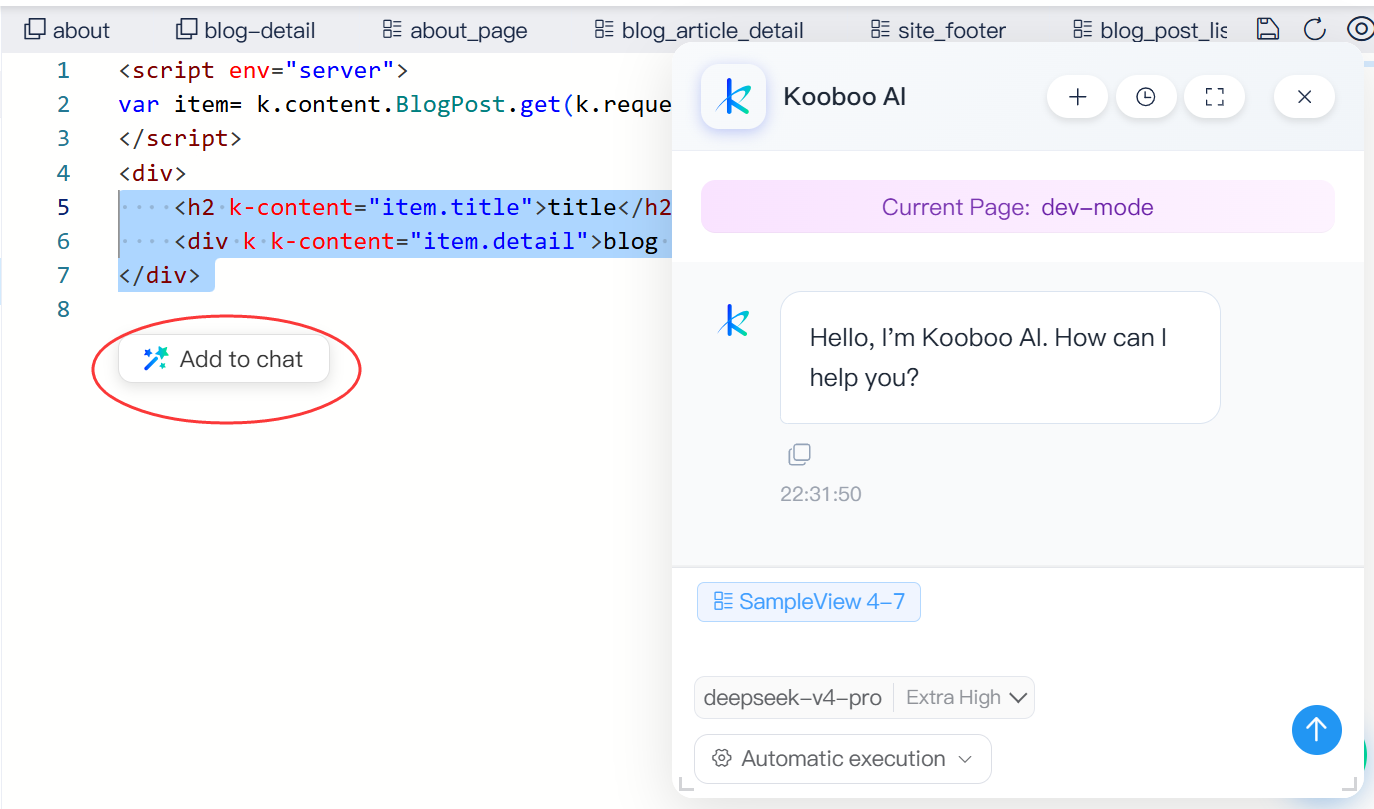
In the backend editor, select the exact lines of code and add them to AI. Kooboo includes the resource, file, line range, and selected code. The developer does not have to paste the entire file or explain where the code belongs.
The working loop becomes:
Select → understand → change → run → inspect → verify
One platform, three ways to build
Kooboo is not only an easier CMS, an online editor, a server-side JavaScript engine, or an AI website generator. Its real advantage comes from combining those capabilities into one development and runtime model.
- No-code entry: ask AI to build and finish the dynamic website.
- HTML entry: create server-rendered, data-driven websites with tags and attributes.
- JavaScript entry: build custom browser and server behavior without a forced frontend/backend split.
- Browser workflow: develop and debug directly against a running Kooboo site.
- Local workflow: use the upcoming CLI with Visual Studio Code and Git.
- Universal runtime: keep the website model consistent from development through testing and production.
- Portable deployment: move complete sites, selected resources, or individual object changes.
The result is not a small improvement to one development task. It is a reduction in how many skills, people, environments, and handoffs are required to turn an idea into a working application.
Bring an idea, HTML, or JavaScript. Kooboo provides the shortest path from each one to a complete live website.